Payment Links
A Payment Link allows you to create a URL linked to your Payment Request invoice.
When to use Payment Links
Print offline QR codes for physical businesses
With a payment link, you can print a static QR code image for display in your stores and integrate it with your point-of-sale system (POS).By integrating your POS system with Request to Pay, you can dynamically link and unlink payment requests to the payment link and QR code, allowing customers to pay quickly. Once paid, you receive a confirmation, supporting reconciliation with your collection process.
Pre-print bills for utilities
Utility companies can use Payment Links to generate QR codes for pre-printed bills, even before actual energy usage is known. After measuring usage, you can update the charge amount through the J.P. Morgan API for payment processing. The following steps illustrate how this use case works:
- The client lives in a rural area with limited Wi-Fi access.
- Before visiting rural clients, the agent collects pre-printed bills from the utility company. Each bill includes a QR code.
- The agent measures the client’s energy consumption and records it offline.
- The agent delivers the pre-printed bill with a QR code to the client.
- Once the agent reaches an area with mobile signal, the utility company updates the QR code’s charge by connecting to our APIs.
- The client can then scan the QR code and complete the payment.
How Payment Links Work
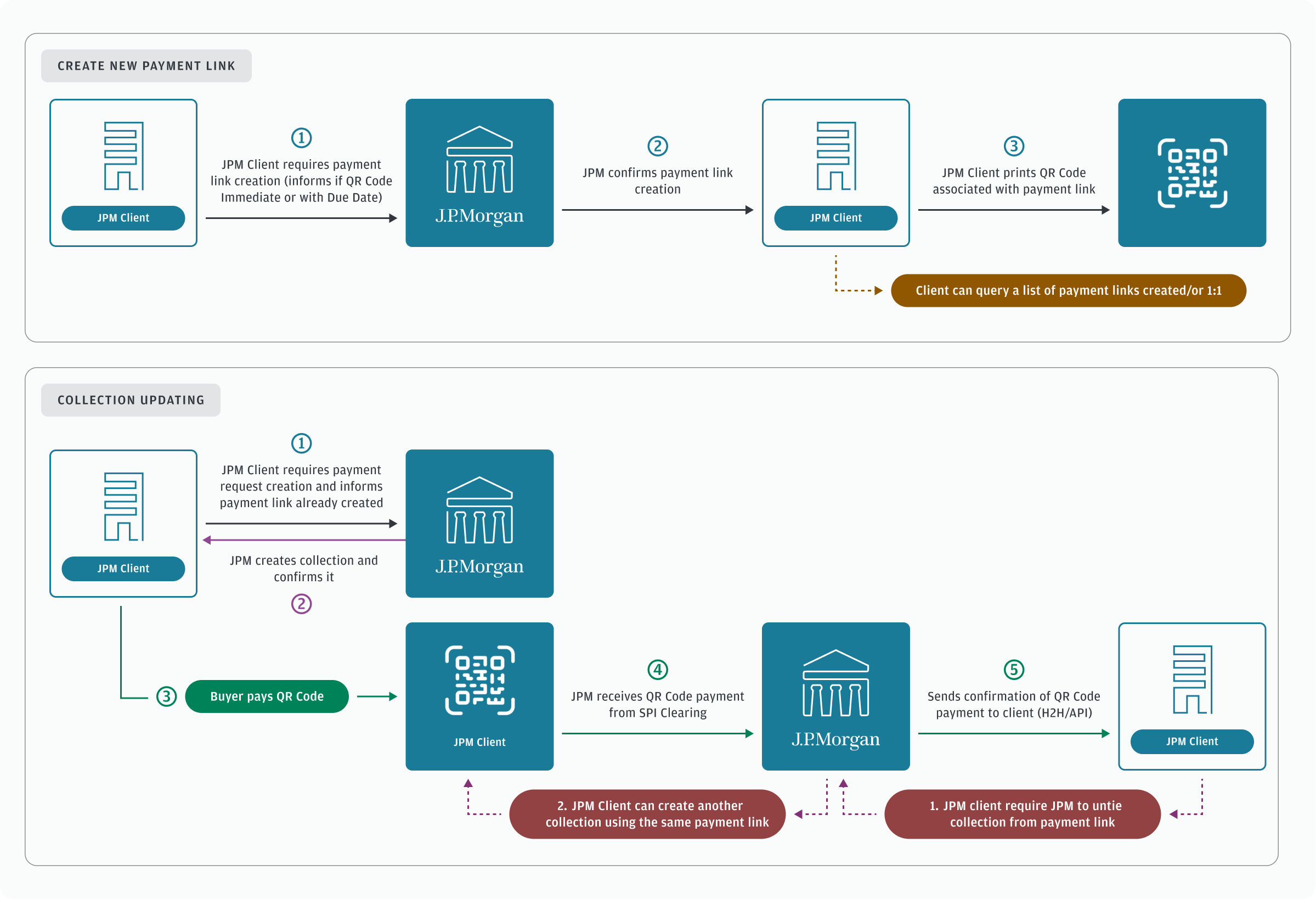
Payment links are embedded into printed QR code images. From a point-of-sale system, you can link and unlink new sales invoices to QR codes as clients make purchases. You can display a unique QR code image at the cashier, and the payment system will send a request to our API to dynamically change the payload with new invoice data, allowing customers to pay the exact amount of their purchases. The business can reconcile payment promptly and release products to customers after payment is received. The following steps illustrate payment links as a high level workflow:
- Create a Payment Link as a printed QR code.
- When a customer makes a purchase, link a Payment Request to your Payment Link.
- When the invoice is paid or expires, unlink the Payment Request.
- Link a new Payment Request for the next customer.
The following diagram shows the technical workflow for Payment Links: