Pay By Bank
Request a refund V1
Use refunds when you need to send money back to someone who has made a payment.
Important information to remember about refunds:
- A payout can only be made based on the ID of an original payment that you have received. This is identified by either the
paymentIdorendToEndIdof the original payment. - You can only make a payout request after 15 minutes has passed since the initial payment.
Send a refund request
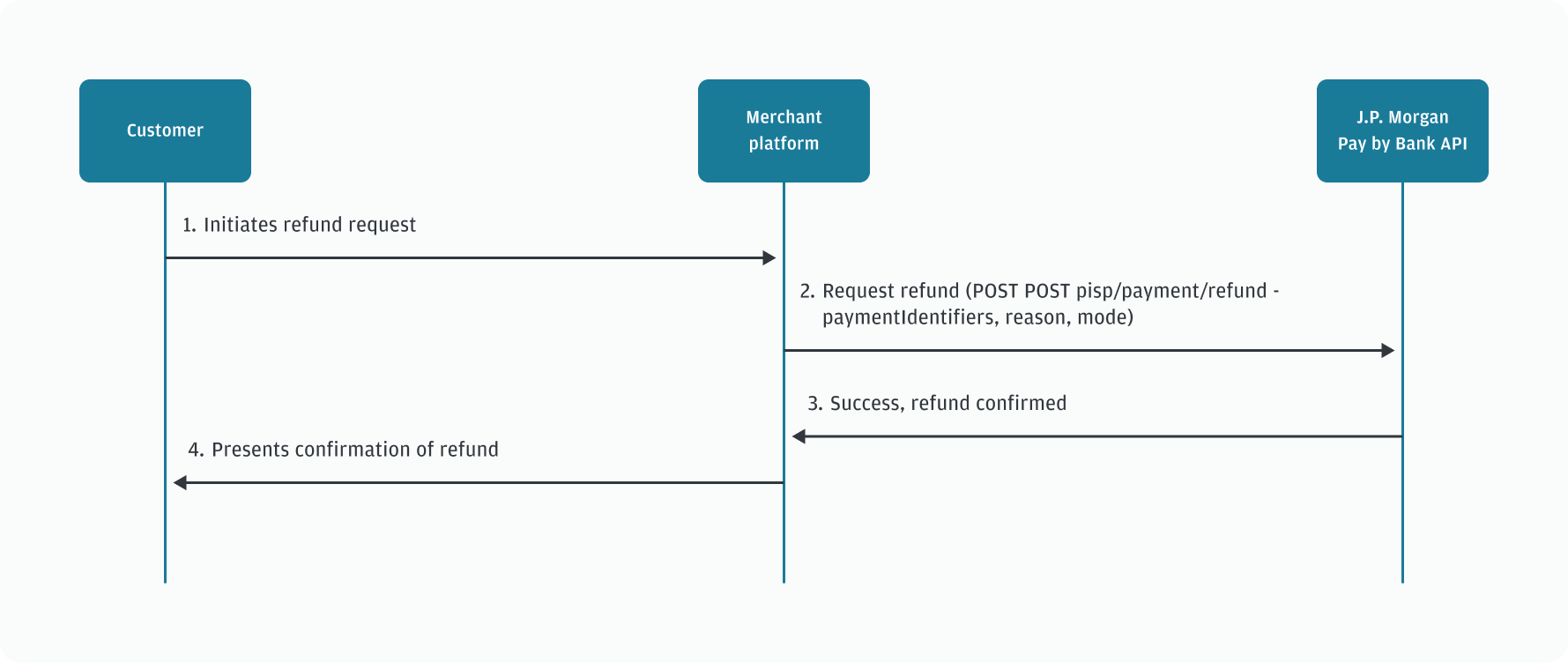
To send a refund, use POST pisp/payment/refund .
You must include:
paymentIdentifiers: A way to identify the payment. Must be either:endToEndId: The unique identifier you allocated to the original payment.paymentId: The unique identifier automatically allocated to the original payment.
amount: The amount of the refund. This cannot exceed the original payment amount.reason: A description of the reason for the refund. Must be one of:REQUESTED_BY_CUSTOMERDUPLICATE_PAYMENTOTHER
mode: The speed the refund must be processed. Must be either:INSTANTNORMAL
Sample request
Json
{
  "paymentIdentifiers": {
    "endToEndId": "123123123"
  },
  "amount": {
    "amount": 10,
    "currency": "GBP"
  },
  "reason": "REQUESTED_BY_CUSTOMER",
  "mode": "INSTANT"
}
Sample response
Json
{
  "refund": {
    "refundId": "45f452df-f84a-4fc1-acee-d024f5fede98",
    "status": "PENDING",
    "paymentIdentifiers": {
      "endToEndId": "123123123"
    },
    "amount": {
      "amount": 10,
      "currency": "GBP"
    },
    "reason": "REQUESTED_BY_CUSTOMER",
    "mode": "INSTANT",
    "statusUpdatedAt": "2022-05-31T14:00:57.751Z"
  }
}
Sequence diagram for a refund request