Virtual accounts
Virtual accounts are a core feature of J.P. Morgan Wallet™, providing a flexible and scalable sub-ledgering system under a single physical Demand Deposit Account (DDA).
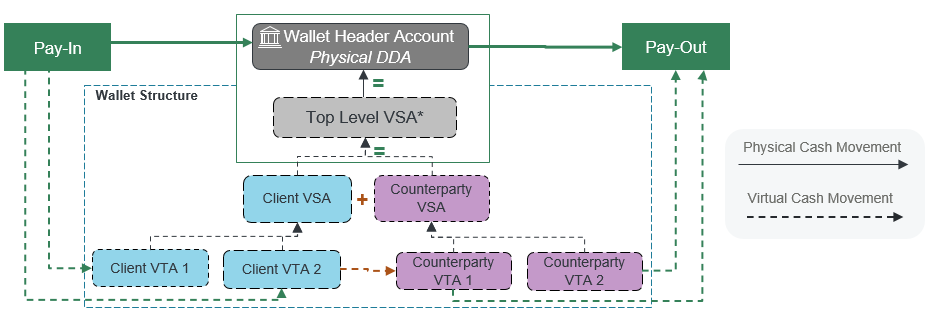
Your virtual account structure consists of a top-level virtual account with multiple child virtual accounts. Your top-level virtual account balance equals the sum of all of its child virtual accounts, which always equals your Wallet DDA balance.
Create multiple virtual accounts and structure them to fit your business needs. The following diagram shows an example of a virtual account structure, and how you can move funds into, between, and out of your accounts:
Use cases
The following are examples of use cases where virtual accounts could provide value.
E-commerce and high-volume payouts: Virtual accounts are ideal for companies needing to pay thousands or millions of counterparties, such as e-commerce platforms, marketplaces, and payment service providers. They allow organizations to manage transactions at the individual counterparty level.
Client and counterparty management: Clients can create unique virtual accounts for each counterparty, enabling precise tracking of amounts owed and paid, and supporting complex business models with multiple counterparties.
Flexible reconciliation: Virtual accounts facilitate detailed reconciliation by assigning unique identifiers to each transaction and counterparty, making it easier to match payments and receipts.
Operational efficiency: Virtual accounts support various transaction types, batch processing, and real-time or scheduled payments, streamlining treasury operations.
Customizable hierarchies: Clients can design multi-level reporting structures—for example, by region, business unit, or customer segment.
Advantages
Virtual accounts have several advantages over other solutions.
Scalability: Clients can establish a large number of virtual accounts, supporting business growth and complex organizational structures.
Enhanced control: Virtual accounts allow granular control over funds, enabling clients to manage balances, set limits, and monitor activity at multiple levels in the hierarchy.
Improved reconciliation: By segregating transactions at the virtual account level, clients achieve faster and more accurate reconciliation, reducing manual effort and errors.
Global and multi-currency support: Virtual accounts support multiple currencies and geographies, making them suitable for global businesses.
Integration and automation: APIs and integration channels enable seamless connectivity with client systems, supporting self-service, automation, and real-time reporting.
Cost and time efficiency: Streamlined onboarding, reduced need for multiple physical accounts, and automated processes lower operational costs and speed up payment cycles.
Regulatory and risk management: Virtual accounts help manage regulatory requirements and mitigate risk by providing clear audit trails and supporting compliance needs.
Virtual account types
There are two types of virtual accounts:
Virtual Summary Account (VSA): A reportable grouping (rollup) of child virtual accounts whose balance equals the combined balance of all child virtual accounts underneath it.
Virtual Transaction Account (VTA): The lowest-level virtual account type—VTAs cannot have child virtual accounts. All transactions post to VTAs. Each VTA can have a distinct Payment Routing Number (PRN), which acts like a bank account routing number and enables counterparties to send money to the VTA.
Virtual Summary Account
A VSA represents a reportable grouping (rollup) of child virtual accounts. Financial transactions do not post to VSAs—a VSA aggregates the balance and transaction data of its underlying virtual accounts and creates hierarchy tiers in the structure. A VSA's balance is the sum of the balances of its child virtual accounts.
There is exactly one Top-Level VSA with no parent which we create. The balance of the Top-Level VSA equals the physical funds balance of the Wallet DDA. Every other virtual account must be a descendant of the Top-Level VSA.
Create any number of VSAs. A VSA can have any number of child virtual accounts, either VSAs or VTAs, but it must have at least one child.
You must assign a unique ID to each VSA that has a maximum of 35 characters and adheres to the requirements in Reference - Allowed characters.
Virtual Transaction Account
A VTA is the lowest-level virtual account type in the structure—it cannot have any child virtual accounts. A VTA's parent must be a VSA.
All debit and credit transactions post to VTAs. These transactions are listed on the daily transaction activity report.
Create any number of VTAs. Create a VTA with or without a PRN, as well as a minimum and maximum balance.
You must assign a unique ID to each VTA that has a maximum of 35 characters and adheres to the requirements in Reference - Allowed characters. You use this ID to send API requests for payments and manage the VTA's attributes.
When a VTA is created, it batch processes overnight and is ready for use on the following day.
States
A virtual account's state refers to its current operational status. This state determines what actions you can perform on the account, such as processing payments. You can manage the state of a VTA using the Wallet API, but you cannot change the state of a VSA.
A VTA can have one of the following states:
CLOSED: The VTA cannot process financial or non-financial requests, and its balance must be zero. After setting a VTA's state toCLOSED, you cannot change it again.OPEN: The VTA can process both financial and non-financial requests.PENDING_CLOSE: The VTA can process both financial and non-financial requests, and is intended to have its balance reduced to zero and its state updated toCLOSED.PENDING_OPEN: The VTA can process non-financial requests (virtual account management and queries), but cannot process financial requests.
VTAs are created in either the PENDING_OPEN or OPEN state.
A VSA can only have the OPEN state.
Balance limits
You can set a minimum and maximum balance on any VTA that you create. Use these limits to control how high or low a VTA's balance may go. Balance limits do not apply to VSAs.
Wallet references balance limits during financial transaction validation processing to accept or reject a debit or credit transaction based on the VTA's allowed balance limits.
Why use balance limits?
Setting up VTA balance limits serves several important purposes:
Risk management and control: Balance limits help clients manage financial risk by preventing individual VTAs from exceeding predefined thresholds. This is especially important when dealing with large numbers of counterparties or high transaction volumes, as it limits potential exposure in case of errors, fraud, or operational issues.
Operational efficiency: By setting minimum and maximum balances, clients can automate controls that prevent overfunding or underfunding of VTAs. This reduces the need for manual monitoring and intervention, streamlining treasury operations and ensuring that funds are allocated efficiently across the virtual account structure.
Customizable client needs: You can set balance limits at both the program level (default for all VTAs) and the individual VTA level (overriding the default as needed). This flexibility enables you to tailor controls to specific counterparties, business units, or use cases, supporting a wide range of operational and business requirements.
Automated exception handling: If a transaction would cause a VTA to exceed its maximum balance or fall below its minimum balance, Wallet processes the transaction and handles the exception, reducing the risk of processing errors and supporting robust balance management.
Support for negative balances: You can set the minimum balance of a VTA to a negative value, providing additional flexibility.
By leveraging these balance limits, you gain greater control, security, and flexibility in managing your virtual account structure.
Technical details
Note the following details about virtual account balance limits.
You can specify balance limits in the
minimumBalanceandmaximumBalancefields in the request when you create or update a VTA.If you do not specify balance limits during VTA creation, the program-level defaults apply. Each VTA has the following default balance limits:
- Default minimum balance: $0.00
- Default maximum balance: $999,999,999,999,999.99
You can set minimum and maximum balances up to the following values:
- Smallest minimum balance: -$999,999,999,999,999.99
- Largest maximum balance: $999,999,999,999,999.99
The minimum balance cannot be larger than the maximum balance.
Wallet validates balance limits against all relevant transaction types (PayIn, PayInto, PayTo, Virtual-to-Virtual, PayOut, and so on).
Payment Routing Numbers
A PRN is a clearing-routable number that masks the actual account number of a VTA. Use a PRN to route incoming payments to a specific VTA.
Why use PRNs?
PRNs are essential for several reasons:
Masking and security: A PRN looks like a traditional account number, but provides an additional layer of security by not exposing the true account number to external parties, reducing the risk of account information being misused or compromised.
Unique identification and routing: Each PRN is uniquely associated with a single VTA, ensuring a 1:1 relationship. This allows incoming payments (such as ACH credits or debits) to be routed directly and accurately to the correct virtual account within your account structure. The PRN is used in payment instructions to identify the VTA to be credited or debited, and it also implicitly identifies the parent Wallet DDA.
Clearing and settlement: When a payment is sent to a PRN, we process the payment and credit or debit both the Wallet DDA and the associated VTA sub-ledger. This enables real-time or near-real-time settlement and reconciliation of funds.
Operational efficiency and automation: By using PRNs, you can automate the allocation of incoming funds to the correct virtual accounts without manual intervention. This is particularly valuable for high-volume environments, such as marketplaces or platforms managing payments for many counterparties.
Regulatory and business requirements: In some regions or business models, having a clearing-routable number for each virtual account is a regulatory or operational requirement. PRNs fulfill this need by providing a compliant, routable identifier for each VTA.
Assign a PRN to a VTA
You can request a PRN for a VTA when you create or update it. Only assign PRNs to VTAs that operate PayInto Receipt or PayOut Collection transaction types. Set the following fields in the API request:
paymentRoutingNumber: Set totrue.virtualAccountState: Set toOPEN.
When you send the API request, we generate and assign a PRN to the VTA. The PRN becomes active and available for use the next business day after you send the request.
The PRN cannot be transferred from the VTA to which it was assigned. There is no way to disable a PRN via the Wallet API, except by closing the VTA.
You can get the PRN of a VTA by getting details about the VTA, or from daily reports. You can also get the PRN from the transaction ID associated with incoming funds, which appears in push notifications and which you can use to query transaction details.
Use a PRN
You can provide the PRN of a VTA to a counterparty and allow them to directly debit or credit the VTA to/from an external account.
For incoming payments into a VTA using its PRN, see PayInto Receipt.
For outgoing payments out of a VTA using its PRN, see PayOut Collection.
Any payment service that validates the account number using standard account validation services will most likely fail because the account will not be found.
The following table shows different payment processors that might or might not work with PRNs.
| Payment processor | Local clearing systems (US ACH/UK BACS/EU SEPA) |
Wire | Real-time payment systems (US RTP/UK FPS/SEPA Instant) |
Notes |
|---|---|---|---|---|
| J.P. Morgan Access | ✓ | ✓ | ✓ | PRNs cannot be used for repetitive Wire transactions. |
| Chase for Business | ✗ | ✓ | ✗ | |
| Chase.com | ✗ | ✓ | ✗ | |
| J.P. Morgan Online | ✗ | ✓ | ✗ | |
| JPMorganChase bank branches | ✗ | ✗ | ✗ | |
| External payment processors | Maybe | Maybe | Maybe | Payment processors outside of the JPMorganChase ecosystem might or might not work with PRNs depending on whether they validate the account number before sending the transaction to the clearing system. |
Posting restrictions
A posting restriction prevents certain types of transactions from posting to a VTA. There are three types of posting restrictions:
DEBITS: Rejects debit transactions on the VTA.CREDITS: Rejects credit transactions on the VTA.ALL: Rejects both debit and credit transactions on the VTA.
Use the Wallet API to add and remove posting restrictions from a VTA that you created. For more information, see Update a Virtual Transaction Account.
You can also use the Wallet API to check what posting restrictions have been added to a VTA. For more information, see Get details about a Virtual Transaction Account.
Virtual account structure
After your Wallet DDA, source funding DDA, and unique program ID are configured, we set up a standard virtual account structure for you. These virtual accounts are required to execute virtual transactions, manage exceptions, and reconcile your Wallet DDA.
Standard virtual accounts
We create the following virtual accounts when we set up your Wallet program:
| Virtual account | Description | Parent | ID |
|---|---|---|---|
| Top-Level VSA | Cannot have any parents. Always equals the physical balance in the Wallet DDA. | N/A | <Wallet DDA ID> Example: 1234567890 |
| Internal VSA (Default Summary Account) | Rollup of all J.P. Morgan-created VTAs. | Top-Level VSA | <Wallet DDA ID>-DSA Example: 1234567890-DSA |
| PayIn Settlement VTA | Wash account where funds are credited prior to being allocated. | Internal VSA (Default Summary Account) | <Program ID>-PAYIN Example: 1234567890-PAYIN |
| PayOut Settlement VTA | Wash account which is credited when funds are paid out of a VTA and is the single point of reconciliation. | Internal VSA (Default Summary Account) | <Program ID>-PAYOUT Example: 1234567890-PAYOUT |
| Default (Reconciliation) VTA | Used to record virtual payments returned to J.P. Morgan, and other "orphan" deposits into your Wallet DDA that did not come through a PayIn API request. | Internal VSA (Default Summary Account) | <Wallet DDA ID>-DEFAULT Example: 1234567890-DEFAULT |
| Self-Balancing VTA | Not visible to you. Captures the offsetting entries for postings directly impacting the Wallet DDA. | Internal VSA (Default Summary Account) | <Wallet DDA ID>-SBAL Example: 1234567890-SBAL |
Custom virtual accounts
After we create the standard virtual account structure, create additional virtual accounts and add them to the structure. Create a structure that replicates your business hierarchy and ecosystem, and organize reporting in a way that's meaningful to your organization.
Create an unlimited number of horizontal and vertical VSA to VTA account relationships within the structure. Plan out your desired virtual account structure prior to creating it so you don't have to significantly change it later.
Examples
The following are examples of how clients in different industries might design their own custom virtual account structures. Each example illustrates how VSAs can be used to group and summarize VTAs, reflecting internal financial, operational, or reporting requirements.
Retail industry
Scenario: A large retailer wants to track sales and settlements by region and store.
Structure:
- Top-Level VSA: "Retail Group VSA"
- Region VSA: "East Region VSA"
- Store VTAs: "Store A VTA", "Store B VTA", "Store C VTA"
- Region VSA: "West Region VSA"
- Store VTAs: "Store D VTA", "Store E VTA"
- Region VSA: "East Region VSA"
How it works: Each VTA tracks an individual store's transactions (sales, refunds, and so on). The Region VSA aggregates all stores in that region, and the Retail Group VSA provides a consolidated view across all regions for reporting and reconciliation.
Insurance industry
Scenario: An insurance company needs to manage premium collections and claim payouts by product line and policyholder.
Structure:
- Top-Level VSA: "Insurance Operations VSA"
- Product Line VSA: "Auto Insurance VSA"
- Policyholder VTAs: "Policyholder A VTA", "Policyholder B VTA"
- Product Line VSA: "Health Insurance VSA"
- Policyholder VTAs: "Policyholder C VTA", "Policyholder D VTA"
- Product Line VSA: "Auto Insurance VSA"
How it works: Each VTA tracks premiums and claims for a specific policyholder. Product Line VSAs aggregate balances and activity for all policyholders under each insurance product, supporting both operational management and regulatory reporting.
Marketplace/e-commerce platform
Scenario: A digital marketplace wants to manage funds for thousands of sellers, grouped by business category.
Structure:
- Top-Level VSA: "Marketplace VSA"
- Category VSA: "Electronics Sellers VSA"
- Seller VTAs: "Seller A VTA", "Seller B VTA"
- Category VSA: "Fashion Sellers VSA"
- Seller VTAs: "Seller C VTA", "Seller D VTA"
- Category VSA: "Electronics Sellers VSA"
How it works: Each VTA tracks an individual seller's sales proceeds and payouts. Category VSAs provide a summary by business type, and the Marketplace VSA gives a platform-wide view for financial oversight and settlement.
Corporate treasury (multinational)
Scenario: A multinational corporation wants to manage cash by country and business unit.
Structure:
- Top-Level VSA: "Global Treasury VSA"
- Country VSA: "US VSA"
- Business Unit VTAs: "US Sales VTA", "US R&D VTA"
- Country VSA: "Germany VSA"
- Business Unit VTAs: "DE Sales VTA", "DE R&D VTA"
- Country VSA: "US VSA"
How it works: Each VTA tracks an individual business unit's cash flows. Country VSAs aggregate all business units in that country, and the Global Treasury VSA provides a consolidated global cash position.
Franchise operations
Scenario: A franchisor wants to monitor franchisee payments and royalties by region and individual franchisee.
Structure:
- Top-Level VSA: "Franchise Network VSA"
- Region VSA: "Midwest Region VSA"
- Franchisee VTAs: "Franchisee A VTA", "Franchisee B VTA"
- Region VSA: "Southeast Region VSA"
- Franchisee VTAs: "Franchisee C VTA", "Franchisee D VTA"
- Region VSA: "Midwest Region VSA"
How it works: Each VTA tracks an individual franchisee's payments and royalies. Regional VSAs summarize activity for all franchisees in a region, supporting royalty calculation, performance analysis, and compliance.
Key points
The following key points apply to every virtual account structure:
Use VTAs for transaction-level detail (for example, an individual store, policyholder, seller, business unit, or franchisee).
Use VSAs for aggregation and reporting (for example, by region, product line, category, or country).
Hierarchies can be as deep as needed, with VSAs parenting other VSAs or VTAs, supporting flexible, client-specific reporting and operational needs.
Next steps
Now that you have learned the basics of virtual accounts, check out the following documentation to learn how to use them:
- Create a virtual account: Create VSAs and VTAs in your Wallet program.
- Get details about a virtual account: Get details about a VTA such as its parent VSA ID, its virtual account type, and its balance.
- Update a virtual account: Update the properties of a VTA, such as its state, its PRN status, and its balance limits.