Receipt requirements
For every card transaction, the J.P. Morgan Payments platform generates receipt data and returns it in the transaction response.
We have specific receipt requirements for using the default receipt provided by the platform or creating a custom receipt from the data returned in API transaction responses.
Learn about receipt printing methods, ways to construct receipt content, requirements for all receipts, receipt language rules, and receipt details for credit, debit, prepaid, and gift card transactions.
Receipt printing methods
You have multiple supported options for where and how you can print receipts.
Print receipts on an integrated printer: If your POS environment includes an integrated receipt printer, generate and print receipts directly from your POS.
Print a custom receipt using the terminal’s built-in printer (DX4000 / DX8000): If you use a payment terminal with a built-in printer (DX4000 countertop or DX8000 handheld), generate a custom receipt by sending a print command to the terminal using the PrintText API.
Print the default terminal receipt template (DX4000 / DX8000): If you use a payment terminal with a built-in printer (DX4000 countertop or DX8000 handheld), print the default receipt template we generate from the receipt object in the transaction response.
Receipt content construction methods
Regardless of where you print, you can construct receipt content in the following ways:
Use the receipt object
Generate your receipt using the receipt object in the API response. You may:
- Print the receipt as-is, or
- Parse and reformat the content to meet your receipt design and formatting needs.
Use structured API response fields
Generate your receipt using the structured fields in the API response, such as transaction identifiers, amounts, card brand, entry mode, and authorization code. Format these fields according to your POS receipt layout.
General receipt requirements
- Give the cardholder the option for a receipt on every transaction.
- Receipts apply to all transaction types, all payment brands, card types, and transaction results of success, error, and decline.
The following is a list of all transaction types where receipts apply:
| Credit and debit card transactions | Gift card transactions |
|---|---|
| Sale | Redemption |
| Authorization | Issuance |
| Incremental authorization | Activation |
| Completion | Balance Inquiry (cardholder copy only) |
| Force Sale | Void |
| MOTO Sale | Force Redemption |
| MOTO Refund | Force Issuance |
| Refund | Force Activation |
| Void | Deactivation |
| Balance Inquiry | Reactivation |
- Label items on the receipt clearly so the merchant and cardholder understand the information.
- For void receipts, include the voided transaction type and the original approval code. The standard receipt object includes these values.
- Abbreviate only if the abbreviation is clear and easily understood.
Receipt language requirements
The following language requirements apply to both cardholder and merchant receipts.
Cardholder receipt
- For locations excluding the province of Quebec, print the cardholder copy of the receipt in the merchant's or cardholder's language.
- For merchant locations in Quebec, you must print the cardholder copy of the receipt in the cardholder's language.
Cardholder receipt language flow
The card data determines the receipt language. If the card data doesn’t specify a language, the Payment Terminal Application UI prompts the cardholder to choose a language for the receipt.
The following diagram shows the transaction flow, including the receipt language prompt.
Merchant receipt
Print the merchant copy of the receipt in the merchant's or cardholder's language.
Merchant receipt language flow
We configure the merchant language during onboarding, which the J.P. Morgan Payment platform uses to determine the receipt language.
The following diagram shows the transaction flow for merchant receipt language selection.
Receipt details for credit, debit, prepaid, and gift cards
The Payment Terminal Application generates default receipts using the merchantReceipt and cardholderReceipt text objects in the API response.
If you are creating your own receipts, these objects are the primary source for the content you print or display. The Payment Terminal Application structures them in a receipt-ready format and include the required receipt elements.
If you choose to construct your receipt from structured API response fields, reference the corresponding fields (for example, terminalID, reference, dateTime, transactionID, authCode, and totalAmount) alongside the receipt text objects.
The following is a sample API response:
{
  "AC":"11B8A96ACAB6674A",
  "AID":"A0000000031010",
  "ARC":"3030",
  "IAD":"06010A03A00000",
  "PARData":"V0010013018037103627480477422",
  "TSI":"0000",
  "TVR":"0000000000",
  "account":"476173******0011",
  "accountType":"0",
  "approval":"approved",
  "approvalMode":"ISSUER",
  "authCode":"001484",
  "authorizedAmount":"500",
  "balance":"0",
  "batchJulianDay":"210",
  "batchNumber":"000002",
  "cardBrand":"VISA",
  "cardToken":"4761736242620011",
  "cardTypeProcessed":"1",
  "cardholderLanguage":"en",
  "cardholderReceipt":"\n         TEST STORE #123\n         213 Test Street\n      Testingvale, TN 12345\n         (123) 456-7890\n\n\nMerc. ID: 9999999\nTerm. ID: 002\nRRN: 210090936531\nWed,Jul 29,2026         09:09:36\n\n              SALE\n\n            APPROVED\n\n      Verified by Signature\n\n        ************0011\nVISA                 Contactless\n\nAMOUNT                     $1.00\nSUBTOTAL                   $1.00\n            ____________________\nTOTAL                      $1.00\n\nTransaction ID:\n                2100000011000001\nBatch#:                  210-001\nApproval Code:            047018\n\nVISA CREDIT\nAID: A0000000031010\n\n\nX  ______________________________\n\n      *** Customer copy ***\n\n            Thank You\n        Please Come Again\n",
  "cashbackAmount":"0",
  "commercialCardType":"-1",
  "currencyCode":"USD",
  "cvm":"Signature",
  "dateTime":"07-29-2026 11:02:22",
  "dccBillingAmount":"0",
  "dccExchangeRate":"0.0",
  "dccIndicator":"0",
  "dccMarkup":"0",
  "dccProvider":"Fexco",
  "demoMode":"no",
  "dueAmount":"0",
  "emvTags":"...", "_comment": "Removed for brevity",
  "expDate":"3112",
  "footerLine1":"Thank You",
  "footerLine2":"Please Come Again",
  "headerLine1":"TEST STORE #123",
  "headerLine2":"213 Test Street",
  "headerLine3":"Testingvale, TN 12345",
  "headerLine4":"(123) 456-7890",
  "merchantID":"9999999",
  "merchantReceipt":"\n         TEST STORE #123\n         213 Test Street\n      Testingvale, TN 12345\n         (123) 456-7890\n\n\nMerc. ID: 9999999\nTerm. ID: 002\nRRN: 210090936531\nWed,Jul 29,2026         09:09:36\n\n              SALE\n\n            APPROVED\n\n      Verified by Signature\n\n        ************0011\nVISA                 Contactless\n\nAMOUNT                     $1.00\nSUBTOTAL                   $1.00\n            ____________________\nTOTAL                      $1.00\n\nTransaction ID:\n                2100000011000001\nBatch#:                  210-001\nApproval Code:            047018\n\nVISA CREDIT\nAID: A0000000031010\n\n\nX  ______________________________\n\n      *** Merchant copy ***\n\n            Thank You\n        Please Come Again\n",
  "operation":"Transaction",
  "preferredName":"VISA CREDIT",
  "processorLine1":"",
  "processorLine2":"",
  "reference":"210110222456",
  "requestedAmount":"500",
  "responseCode":"00",
  "result":"0",
  "safState":"-1",
  "safSubmissionState":"0",
  "shift":"1",
  "signatureRequired":"yes",
  "subTotalAmount":"500",
  "surchargeAmount":"0",
  "surchargeFixed":"0",
  "surchargePercentage":"0",
  "table":"0",
  "taxAmount":"0",
  "taxAmount2":"0",
  "taxLabel":"Tax:",
  "taxLabel2":"TAX2:",
  "taxSurchargeAmount":"0",
  "taxTotalAmount":"0",
  "terminalID":"002",
  "tipAmount":"0",
  "totalAmount":"500",
  "transactionID":"2100000021000002",
  "transactionType":"SALE",
  "type":"SALE",
  "uniqueTransactionId":"700000014039002178533734200100"
}
The following is the cardholderReceipt text object from the preceding API response.
"cardholderReceipt":"\n         TEST STORE #123\n         213 Test Street\n      Testingvale, TN 12345\n
(123) 456-7890\n\n\nMerc. ID: 9999999\nTerm. ID: 002\nRRN: 210090936531\nWed,Jul 29,2026
09:09:36\n\n              SALE\n\n            APPROVED\n\n      Verified by Signature\n\n
************0011\nVISA                 Contactless\n\nAMOUNT                     $1.00\nSUBTOTAL
$1.00\n            ____________________\nTOTAL
$1.00\n\nTransaction ID:\n                2100000011000001\nBatch#:                  210-001\nApproval Code:
047018\n\nVISA CREDIT\nAID: A0000000031010\n\n\nX  ______________________________\n\n
*** Customer copy ***\n\n            Thank You\n        Please Come Again\n",
The following is the merchantReceipt text object from the preceding API response.
"merchantReceipt":"\n         TEST STORE #123\n         213 Test Street\n      Testingvale, TN 12345\n
(123) 456-7890\n\n\nMerc. ID: 9999999\nTerm. ID: 002\nRRN: 210090936531\nWed,Jul 29,2026
09:09:36\n\n              SALE\n\n            APPROVED\n\n      Verified by Signature\n\n
************0011\nVISA                 Contactless\n\nAMOUNT                     $1.00\nSUBTOTAL
$1.00\n            ____________________\nTOTAL                      $1.00\n\nTransaction ID:\n
2100000011000001\nBatch#:                  210-001\nApproval Code:
047018\n\nVISA CREDIT\nAID: A0000000031010\n\n\nX  ______________________________\n\n
*** Merchant copy ***\n\n            Thank You\n        Please Come Again\n",
These objects use the escape code \n to define line breaks and use leading or trailing spaces to center, justify, or right-align content in the default receipt format for terminals with built-in printers: the DX4000 and DX8000.
Sample cardholder and merchant receipts
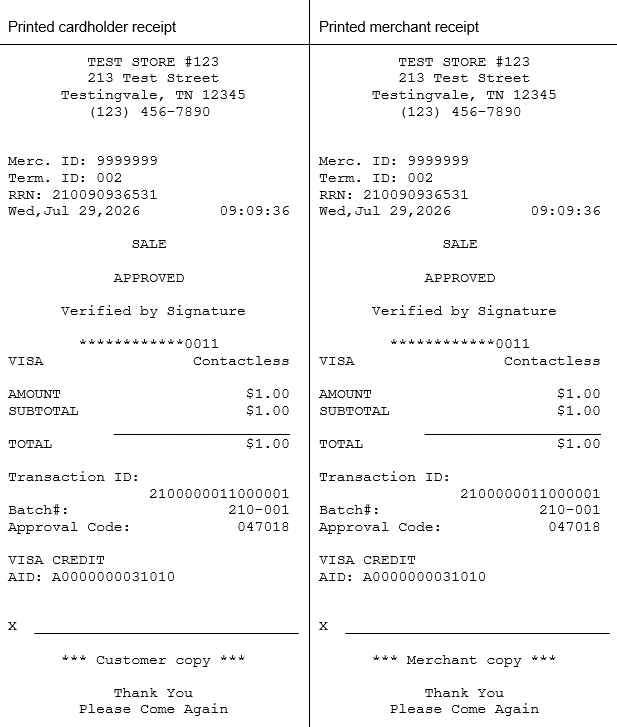
The following image presents the default printed format of the cardholderReceipt and merchantReceipt text objects on DX4000 and DX8000 terminals.
Receipt field mapping table
The following table presents each line of the receipt objects without the blank lines that provide spacing. In the example Appearance columns, we have removed formatting spaces and left-aligned the content.
The table data shows an example approved Sale transaction.
| Receipt field | API field or Parameter Source (ALL CAPS) |
Required? Configurable? |
Appearance on Cardholder receipt |
Appearance on Merchant receipt |
|---|---|---|---|---|
| Merchant receipt header line 1 | HEADERLN1 | Required | Company Name | Company Name |
| Merchant receipt header line 2 |
HEADERLN2 | Optional, configurable | Street Address | Street Address |
| Merchant receipt header line 3 |
HEADERLN3 | Optional, configurable | City, State, Zip | City, State, Zip |
| Merchant receipt header line 4 | HEADERLN4 | Optional, configurable | Phone Number | Phone Number |
| Merchant receipt header line 5 | HEADERLN5 | Optional, configurable | [additional info] | [additional info] |
| Merchant receipt header line 6 | HEADERLN6 | Optional, configurable | [additional info] | [additional info] |
| Merchant ID | merchantID | Required | N/A |
Merc. ID: 9999999 |
| Terminal ID | terminalID | Required | Term. ID: 002 | Term. ID: 002 |
| Request reference | reference | Required | RRN: 092112909069 | RRN: 092112909069 |
| Table number (restaurant settings only) |
table | Required | Table: 0 | Table: 0 |
| Transaction date and time | dateTime | Required | Thu,Apr 02,2026 11:29:09 | Thu,Apr 02,2026 11:29:09 |
| Transaction type | transactionType | Required | SALE | SALE |
| Transaction result | approval | Required | APPROVED | APPROVED |
| Customer verification method | cvm | Required | No Signature Required | No Signature Required |
| Account number | account | Required | ************0443 | ************0443 |
| Card brand and entry mode | cardBrand and entryMode | Required | VISA Contactless | VISA Contactless |
| Account type (Interac EMV contact transactions only) |
accountType | Required | CHEQUING | CHEQUING |
| Requested amount | requestedAmount | Required | AMOUNT $1.00 | AMOUNT $1.00 |
| Subtotal | subTotalAmount | Required | SUBTOTAL $1.00 | SUBTOTAL $1.00 |
| Cashback amount (shown only when requested) |
cashback | Required | CASHBACK $XX.00 | CASHBACK $XX.00 |
| Separator line | N/A | N/A | ________________ | ________________ |
| Total | totalAmount | Required | TOTAL $1.00 | TOTAL $1.00 |
| Amount due (partially approved transactions only) |
dueAmount | Required | AMT.DUE $XX.00 | AMT.DUE $XX.00 |
| Available balance (debit, EBT, and gift cards only; label varies by card type) |
balance | Required | N/A | Balance Debit Card: $200.00 |
| Transaction ID label | N/A | Required | Transaction ID: | Transaction ID: |
| JPMC Transaction ID | transactionID | Required | 910000011000009 | 910000011000009 |
| Batch number (Julian day + batch number) |
batchJulianDay and last three digits of the batchNumber | Required | Batch#: 091-001 | Batch#: 091-001 |
| Trace number (debit and EBT transactions only) |
traceNumber | Required | Trace: 00484443 | Trace: 00484443 |
| Authorization code | authCode | Required | Approval Code: 060328 | Approval Code: 060328 |
| Card brand (value depends on card) |
preferredName | Required | CHASE VISA | CHASE VISA |
| Card application identifier (not included for swiped transactions) |
AID | Required | AID: A0000000031010 | AID: A0000000031010 |
| Signature line (merchant receipt only; controlled by CVM and signature parameters) |
Signature line | Configurable | N/A | N/A |
| Cardholder name (merchant receipt only; not shown on Interac; parameter-controlled) |
cardholderName CHNPRINT |
Configurable | N/A | LAST/FIRST |
| Label for receipt copy | N/A | N/A | *** Customer copy *** | *** Merchant copy *** |
| Gift card tip authorization statement (required when a tip is included) |
N/A | Required | N/A | I AUTHORIZE THE TRANSFER OF FUNDS FOR THE AMOUNT OF THIS TRANSACTION |
| Merchant receipt footer line 1 |
FOOTLN1 | Configurable | Thank You | Thank You |
| Merchant receipt footer line 2 |
FOOTLN2 | Configurable | Please Come Again | Please Come Again |
| Merchant receipt footer line 3 | FOOTLN3 | Configurable | [additional message] | [additional message] |
Amount fields on our receipts
A transaction response may contain multiple different amount values depending on context of the transaction. The preceding receipt field mapping table only lists some of the amount response fields. The following is the complete list of all amount fields that the API response could return, and the logical sequence they may appear in receipt data:
- requestedAmount: The original amount of the transaction. This is the base amount and does not include the tipAmount, taxAmount, surchargeAmount, or cashBackAmount.
- taxAmount: If you provide this value in the request, it overrides the tax amount the Payment Terminal App calculates based on the TAXPERCENT parameter (if configured). Canada and some states require you to print the tax amount on the receipt.
- taxAmount2: If you provide this value in the request, it overrides the tax amount the Payment Terminal App calculates based on the TAXPERCENT2 parameter (if configured). Canada may require you to print a second tax amount on the receipt.
- subTotalAmount: The subTotalAmount comprises the requestedAmount, taxAmount and taxAmount2.
- cashBackAmount: The cash back amount, if applicable.
- tipAmount: The tip amount entered during the transaction.
- surchargeAmount: The surcharge amount, if the transaction includes a surcharge.
- totalAmount: The sum of all the amounts in the transaction.
- authorizedAmount: The amount that the issuer authorizes on the card. The authorizedAmount will match the totalAmount unless there is a partial authorization.
- dueAmount: For partial authorizations this field contains the difference between the totalAmount and the amount the issuer approved, that is, the authorizedAmount.