Authorization, Incremental Authorization, and Completion
The Payment Terminal Application supports Authorization, Incremental Authorization, and Completion operations to process and settle transactions.
Authorization
The Authorization operation allows a merchant and a cardholder to perform an initial hold on the cardholder’s account using any of the supported card brands and entry modes.
Authorization transactions can be incremented using the Incremental Authorization operation, captured using the Completion operation, or reversed using the Void operation. All subsequent operations must be sent to the same terminal as the original Authorization operation.
Properties
The following table lists the properties of an Authorization operation.
Item |
Description |
|---|---|
Operation name displayed on a terminal |
Authorization |
Operation name displayed on a receipt |
|
Cardholder is requested to supply the following data |
Card, EMV Application Selection, PIN, signature |
ISO transaction message |
1100 |
Can the operation be autoreversed? |
Yes |
Does the operation use data supplied by the cardholder? |
Yes |
Merchant copy of the receipt? |
Yes |
Cardholder copy of the receipt? |
Yes |
Is the receipt stored as “last receipt”? |
Yes |
Can the receipt have a signature line? |
Yes |
Request fields
The following table lists and defines the request fields for Authorization:
| Field | Description | Presence |
|---|---|---|
operation |
Contains the value Transaction. |
Mandatory |
type |
The transaction type. | Mandatory |
requestedAmount |
|
Mandatory |
reference |
A POS-generated reference number.
|
Optional |
invoice |
|
Optional |
|
|
Optional |
|
|
Optional |
|
|
Optional |
expDate |
|
Optional |
zip |
|
Optional |
address |
The address associated to the cardholder account (for AVS purposes). | Optional |
lastFour |
Last 4 digits of the card number. When provided by the POS application, the Payment Terminal Application uses this field for fraud control by comparing with the captured card number. | Optional |
duplicateCheck |
If you send a value of 1, the Payment Terminal Application checks the last performed transaction for a matching card number and amount. If the previous transaction matches, the Payment Terminal Application returns an error. Value:
|
Optional |
|
|
Optional |
printReceipt |
Applies to receipts printed by the payment terminal device or a printer attached to it. If you omit Value:
|
Optional |
Example
The following example is a request to process an authorization:
{
  "operation": "Transaction",
  "type": "AUTHORIZATION",
  "requestedAmount": "100",
  "uniqueTransactionId": "pZW32xWSNP"
}
The following example is an Authorization response:
{
  "AC": "BAF2EC65818859AE",
  "AID": "A0000000041010",
  "ARC": "3030",
  "IAD": "0214A04303A20000000000000000000000FF",
  "PARData": "5001432GQAD3K4ZSTWAL0SDD2G783",
  "TSI": "",
  "TVR": "0000008001",
  "account": "521307******5936",
  "approval": "approved",
  "authCode": "05082Z",
  "authorizedAmount": "100",
  "batchJulianDay": "293",
  "batchNumber": "000002",
  "cardBrand": "MASTERCARD",
  "cardTypeProcessed": "1",
  "cardholderLanguage": "en",
  "cardholderName": "CHASE MASTERCARD/CUSTOMER",
  "cardholderReceipt": "\n\n\nMerc. ID: 9999999\nTerm. ID: 122\nRRN: 293155502432\nTue,Oct 20,2026         15:55:02\n\n            PRE-AUTH\n\n            APPROVED\n\n      No Signature Required\n\n        ************5936\nMASTERCARD           Contactless\n\nAMOUNT                     $1.00\n                   - - - - - - -\nTotal                      $1.00\n\nTransaction ID:\n                2930000022000015\nBatch#:                  293-002\nApproval Code:            05082Z\n\nCHASE MASTERCARD\nAID: A0000000041010\n\n      *** Customer Copy ***\n\n            Thank you\n        Please come again\n",
  "currencyCode": "USD",
  "cvm": "NO CVM",
  "dateTime": "10-20-2026 15:55:02",
  "demoMode": "no",
  "dueAmount": "0",
  "emvTags": "...",
  "_comment": "Removed for brevity",
  "entryMode": "Contactless",
  "expDate": "3005",
  "footerLine1": "Thank you",
  "footerLine2": "Please come again",
  "merchantID": "9999999",
  "merchantReceipt": "\n\n\nMerc. ID: 9999999\nTerm. ID: 122\nRRN: 293155502432\nTue,Oct 20,2026         15:55:02\n\n            PRE-AUTH\n\n            APPROVED\n\n      No Signature Required\n\n        ************5936\nMASTERCARD           Contactless\n\nAMOUNT                     $1.00\n                   - - - - - - -\nTotal                      $1.00\n\nTransaction ID:\n                2930000022000015\nBatch#:                  293-002\nApproval Code:            05082Z\n\nCHASE MASTERCARD\nAID: A0000000041010\n\nCHASE MASTERCARD/CUSTOMER\n\n      *** Merchant Copy ***\n\n            Thank you\n        Please come again\n",
  "operation": "Transaction",
  "preferredName": "CHASE MASTERCARD",
  "reference": "293155502432",
  "requestedAmount": "100",
  "responseCode": "00",
  "result": "0",
  "shift": "1",
  "signatureRequired": "no",
  "table": "0",
  "terminalID": "122",
  "totalAmount": "100",
  "transactionID": "2930000022000015",
  "transactionType": "PRE-AUTH",
  "type": "AUTHORIZATION",
  "uniqueTransactionId": "pZW32xWSNP"
}
Tokenized Authorization
Tokenization is the process of replacing sensitive card data with a unique identification token that retains all the essential information without compromising security. At the point-of-sale (POS), the token is captured and forwarded through the normal authorization flow, where the network or token service provider detokenizes the token to the underlying primary account number (PAN) in a controlled, secure environment so the issuer can authorize the purchase.
Token transactions are processed as card-not-present (CNP) and routed through the credit rail. Because token transactions are not processed as debit, token transactions do not support PIN entry.
Example
The following example is a token transaction authorization request:
{
  "operation": "Transaction",
  "type": "AUTHORIZATION",
  "requestedAmount": "100",
  "cardToken": "6327162778791955",
  "expDate": "3005"
  "uniqueTransactionId": "TvoxWkieeO",
}
The following example is a token transaction authorization response:
{
  "AC": "",
  "ARC": "",
  "IAD": "",
  "PARData": "V0010013825128727659852699277",
  "TSI": "",
  "approval": "approved",
  "authCode": "07680A",
  "authorizedAmount": "100",
  "batchJulianDay": "293",
  "batchNumber": "000001",
  "cardBrand": "VISA",
  "cardToken": "6327162778791955",
  "cardTypeProcessed": "1",
  "cardholderReceipt": "\n\n\nMerc. ID: 9999999\nTerm. ID: 005\nRRN: 293125922228\nTue,Oct 20,2026         12:59:22\n\n            PRE-AUTH\n\n            APPROVED\n\n      No Signature Required\n\nVISA\n\nAMOUNT                     $1.00\n                   - - - - - - -\nTotal                      $1.00\n\nTransaction ID:\n                2930000012000001\nBatch#:                  293-001\nApproval Code:            07680A\n\n\n      *** Customer Copy ***\n\n            Thank you\n        Please come again\n",
  "currencyCode": "USD",
  "cvm": "NO CVM",
  "dateTime": "10-20-2026 12:59:22",
  "demoMode": "no",
  "dueAmount": "0",
  "entryMode": "None",
  "expDate": "3005",
  "footerLine1": "Thank you",
  "footerLine2": "Please come again",
  "merchantID": "9999999",
  "merchantReceipt": "\n\n\nMerc. ID: 9999999\nTerm. ID: 005\nRRN: 293125922228\nTue,Oct 20,2026         12:59:22\n\n            PRE-AUTH\n\n            APPROVED\n\n      No Signature Required\n\nVISA\n\nAMOUNT                     $1.00\n                   - - - - - - -\nTotal                      $1.00\n\nTransaction ID:\n                2930000012000001\nBatch#:                  293-001\nApproval Code:            07680A\n\n\n      *** Merchant Copy ***\n\n            Thank you\n        Please come again\n",
  "operation": "Transaction",
  "reference": "293125922228",
  "requestedAmount": "100",
  "responseCode": "00",
  "result": "0",
  "shift": "1",
  "signatureRequired": "no",
  "table": "0",
  "terminalID": "005",
  "totalAmount": "100",
  "transactionID": "2930000012000001",
  "transactionType": "PRE-AUTH",
  "type": "AUTHORIZATION",
  "uniqueTransactionId": "TvoxWkieeO"
}
Incremental Authorization
The Payment Terminal Application supports incremental authorization to increase the authorized amount of an existing approved authorization (pre-auth) transaction. This operation enables the POS application to request an increase to an approved authorization amount when the originally approved amount is no longer sufficient. Incremental authorization is commonly used in hospitality, bar tabs, rental, and service-based workflows where the final amount may not be known at the time the original authorization is obtained.
Incremental authorization uses cases include:
- Restaurant / Hospitality Tab – Increase an existing tab authorization as additional purchases occur.
- Rental Services – Increase the authorized balance due to extended rental periods or services.
Operation flow
The operation flow for Incremental Authorization is as follows:
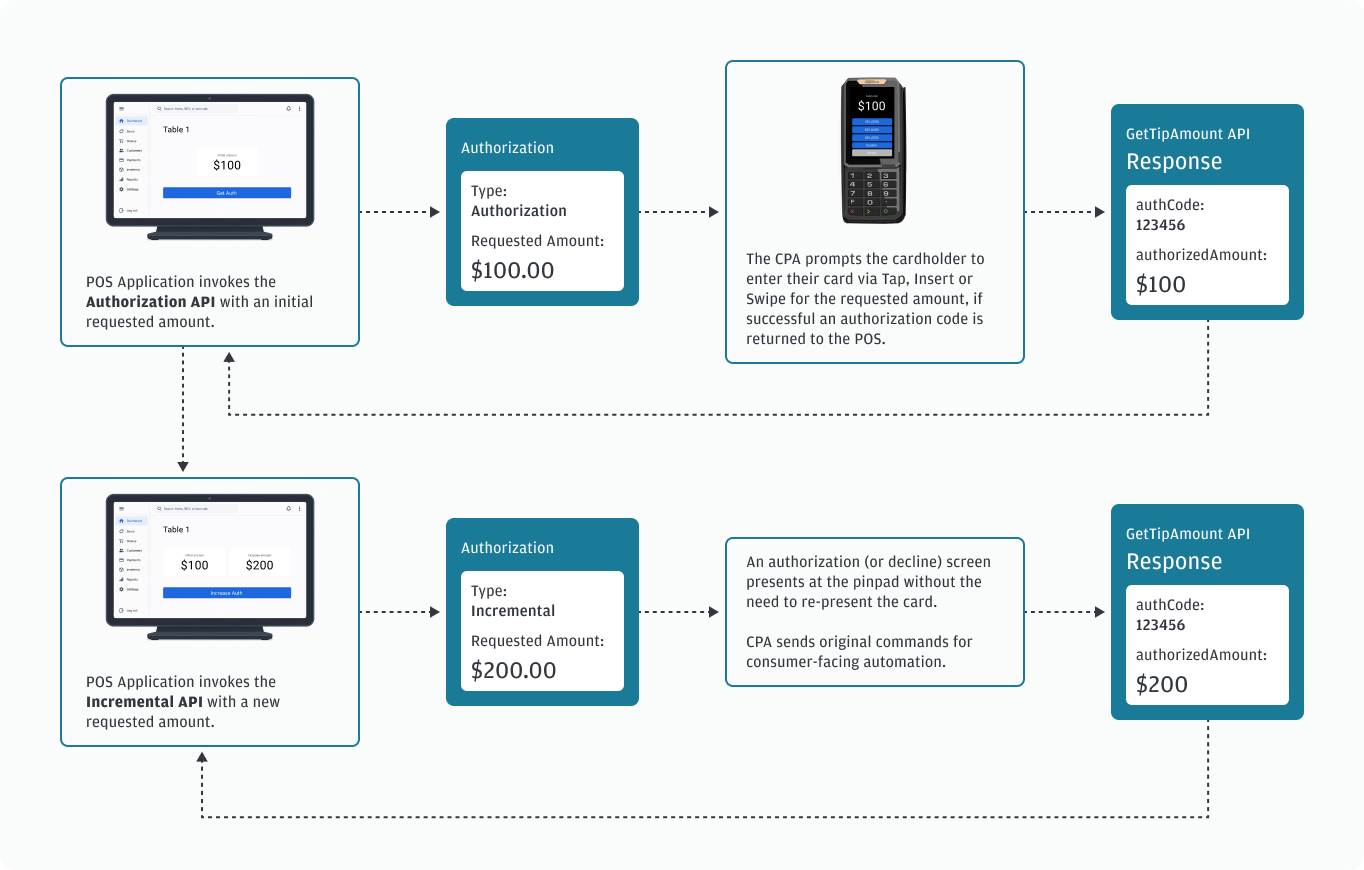
- The POS application initiates an Authorization transaction for the desired initial amount.
- The Payment Terminal Application replies with an authorization code (the
authCodefield) that the POS application must store. - The POS application initiates an Incremental Authorization for the additional added amount, referencing the original
authCode. This must be sent to the same terminal as the initial Authorization. - The Payment Terminal Application replies with a new
authCode. This code is not used in subsequent transactions. Store this data for troubleshooting. - For additional Incremental Authorizations, use the
authCodefrom the original Authorization. - To capture the transaction, the POS application sends a Completion transaction for the final amount to the same terminal used for the initial authorization and subsequent incremental authorization(s). This amount may be one of the following:
- Equal to sum of the initial Authorization plus all subsequent Authorizations.
- Less than the sum of the initial Authorization plus all subsequent Authorizations. This is a partial capture and the authorized amount that is not sent for completion is released.
- For a limited set of food and beverage merchant category codes (MCCs), the Completion amount may be more than the sum of the Initial Authorization and all subsequent Authorizations. Discuss with your integration specialist and see our documentation on tipping.
The sequence diagram provides a technical view of the end-to-end Authorization and Incremental Authorization message exchange between the POS application, the Payment Terminal Application, and our payment host.
Request fields
The Incremental Authorization operation requires a previously approved authorization transaction.
The following table lists and defines the request fields for Incremental Authorization:
| Field | Description | Presence |
|---|---|---|
operation |
Contains the value Transaction. |
Mandatory |
type |
Contains the value INCREMENTAL. |
Mandatory |
requestedAmount |
|
Mandatory |
originalAuthCode |
|
Mandatory |
Example
The following example is an Incremental Authorization request:
{
  "operation": "Transaction",
  "type": "INCREMENTAL",
  "requestedAmount": "10",
  "originalAuthCode": "05082Z",
  "uniqueTransactionId": "Wev8iB6cPX"
}
The following example is an Incremental Authorization response:
{
  "AC": "BAF2EC65818859AE",
  "ARC": "3030",
  "IAD": "",
  "PARData": "5001432GQAD3K4ZSTWAL0SDD2G783",
  "TSI": "",
  "TVR": "0000008001",
  "account": "521307******5936",
  "approval": "approved",
  "authCode": "06595Z",
  "authorizedAmount": "10",
  "batchJulianDay": "293",
  "batchNumber": "000002",
  "cardBrand": "MASTERCARD",
  "cardTypeProcessed": "1",
  "cardholderName": "CHASE MASTERCARD/CUSTOMER",
  "cardholderReceipt": "\n\n\nMerc. ID: 9999999\nTerm. ID: 122\nRRN: 293155552622\nTue,Oct 20,2026         15:55:52\n\n        INCREMENTAL AUTH\n\n            APPROVED\n\n      No Signature Required\n\n        ************5936\nMASTERCARD           Contactless\n\nORIGINAL AMOUNT\n                           $1.00\nINCREMENTAL AMOUNT\n                           $0.10\n                   - - - - - - -\nTotal                      $1.10\n\nTotal Authorized\n$1.10\n\nTransaction ID:\n                2930000022000016\nBatch#:                  293-002\nApproval Code:            06595Z\n\n      *** Customer Copy ***\n\n            Thank you\n        Please come again\n",
  "currencyCode": "USD",
  "cvm": "NO CVM",
  "dateTime": "10-20-2026 15:55:52",
  "demoMode": "no",
  "entryMode": "Contactless",
  "expDate": "3005",
  "footerLine1": "Thank you",
  "footerLine2": "Please come again",
  "merchantID": "9999999",
  "merchantReceipt": "\n\n\nMerc. ID: 9999999\nTerm. ID: 122\nRRN: 293155552622\nTue,Oct 20,2026         15:55:52\n\n        INCREMENTAL AUTH\n\n            APPROVED\n\n      No Signature Required\n\n        ************5936\nMASTERCARD           Contactless\n\nORIGINAL AMOUNT\n                           $1.00\nINCREMENTAL AMOUNT\n                           $0.10\n                   - - - - - - -\nTotal                      $1.10\n\nTotal Authorized\n$1.10\n\nTransaction ID:\n                2930000022000016\nBatch#:                  293-002\nApproval Code:            06595Z\n\nCHASE MASTERCARD/CUSTOMER\n\n      *** Merchant Copy ***\n\n            Thank you\n        Please come again\n",
  "operation": "Transaction",
  "reference": "293155552622",
  "requestedAmount": "10",
  "responseCode": "00",
  "result": "0",
  "signatureRequired": "no",
  "table": "0",
  "terminalID": "122",
  "totalAmount": "10",
  "transactionID": "2930000022000016",
  "transactionType": "INCREMENTAL AUTH",
  "type": "INCREMENTAL",
  "uniqueTransactionId": "Wev8iB6cPX"
}
Response handling
The following table lists and defines the Incremental Authorization result codes:
| Result code | Description |
|---|---|
| 0 | OK; the operation completed successfully, and the response includes the selected tip amount. |
| 1 | Application Error: These errors represent failures of processes internal to the application. Examples include being unable to create a new thread, file access errors, or loss of communication. |
| 3 | Message Error; the request includes an invalid field, a required field is missing, or the request format is invalid. |
| 5 | Busy; another operation is already in progress, and a new operation cannot be started. |
| 10 | Timeout: the prompt timed out before input was completed. |
| 11 | Cancelled by user; the cardholder pressed the cancel key. |
| 12 | Cancelled by POS; the POS application cancelled the operation. |
Receipt requirements
A successful incremental authorization generates a receipt documenting the approval of the additional authorized amount.
Refer to the general Receipt requirements for further details.
Completion
The Completion operation applies to a previous authorization in the same batch and enables you to perform a final capture on an approved authorization. Send the completion to the same terminal as the authorization. The Completion operation does not apply to tip on receipt adjustments or restaurant industry data.
Properties
The following table lists the properties of a Completion operation.
Item |
Description |
|---|---|
Operation name displayed on a terminal |
Completion |
Operation name displayed on a receipt |
|
Merchant is requested to supply the following data |
Amount and original authorization code. |
Cardholder is requested to supply the following data |
Signature |
ISO transaction message |
1200 |
Can the operation be autoreversed? |
Yes |
Does the operation use data supplied by the cardholder? |
Yes |
Merchant copy of the receipt? |
Yes |
Cardholder copy of the receipt? |
Yes |
Is the receipt stored as “last receipt”? |
Yes |
Can the receipt have a signature line? |
Yes |
Request fields
The following table lists and defines the request fields for Completion:
| Field | Description | Presence |
|---|---|---|
operation |
Contains the value Transaction. |
Mandatory |
type |
The transaction type. | Mandatory |
requestedAmount |
|
Mandatory |
reference |
A POS-generated reference number.
|
Optional |
originalAuthCode |
|
Mandatory |
taxAmount |
|
Optional |
cardToken |
Card token used for credential on file transactions. | Optional |
expDate |
|
Optional |
zip |
|
Optional |
address |
The address associated to the cardholder account (for AVS purposes). | Optional |
lastFour |
Last 4 digits of the card number. When provided by the POS application, the Payment Terminal Application uses this field for fraud control by comparing with the captured card number. | Optional |
duplicateCheck |
If you send a value of 1, the Payment Terminal Application checks the last performed transaction for a matching card number and amount. If the previous transaction matches, the Payment Terminal Application returns an error. Value:
|
Optional |
|
|
Optional |
printReceipt |
Applies to receipts printed by the payment terminal device or a printer attached to it. If you omit Value:
|
Optional |
Example
The following is an example of a request to process a completion:
{
  "operation": "Transaction",
  "type": "COMPLETION",
  "requestedAmount": "110",
  "originalAuthCode": "05082Z",
  "uniqueTransactionId": "BNX6lsvbPD"
}
The following example is a Completion response:
{
  "AC": "",
  "ARC": "3030",
  "IAD": "",
  "TSI": "",
  "account": "521307******5936",
  "approval": "approved",
  "approvalMode": "ISSUER",
  "authCode": "05082Z",
  "authorizedAmount": "110",
  "batchJulianDay": "293",
  "batchNumber": "000002",
  "cardBrand": "MASTERCARD",
  "cardTypeProcessed": "1",
  "cardholderReceipt": "\n\n\nMerc. ID: 9999999\nTerm. ID: 122\nRRN: 293155631217\nTue,Oct 20,2026         15:56:31\n\n       PRE-AUTH COMPLETION\n\n            APPROVED\n\n      No Signature Required\n\n        ************5936\nMASTERCARD           Contactless\n\nAMOUNT                     $1.10\n                   - - - - - - -\nTotal                      $1.10\n\nTransaction ID:\n                2930000021000015\nBatch#:                  293-002\nApproval Code:            05082Z\n\n\n      *** Customer Copy ***\n\n            Thank you\n        Please come again\n",
  "currencyCode": "USD",
  "cvm": "NO CVM",
  "dateTime": "10-20-2026 15:56:31",
  "demoMode": "no",
  "entryMode": "Contactless",
  "expDate": "3005",
  "footerLine1": "Thank you",
  "footerLine2": "Please come again",
  "merchantID": "9999999",
  "merchantReceipt": "\n\n\nMerc. ID: 9999999\nTerm. ID: 122\nRRN: 293155631217\nTue,Oct 20,2026         15:56:31\n\n       PRE-AUTH COMPLETION\n\n            APPROVED\n\n      No Signature Required\n\n        ************5936\nMASTERCARD           Contactless\n\nAMOUNT                     $1.10\n                   - - - - - - -\nTotal                      $1.10\n\nTransaction ID:\n                2930000021000015\nBatch#:                  293-002\nApproval Code:            05082Z\n\n\n      *** Merchant Copy ***\n\n            Thank you\n        Please come again\n",
  "operation": "Transaction",
  "reference": "293155631217",
  "requestedAmount": "110",
  "responseCode": "00",
  "result": "0",
  "signatureRequired": "no",
  "surchargeAmount": "0",
  "surchargeFixed": "0",
  "surchargePercentage": "0",
  "taxAmount": "0",
  "taxAmount2": "0",
  "taxLabel": "Tax1",
  "taxLabel2": "Tax2",
  "terminalID": "122",
  "tipAmount": "0",
  "totalAmount": "110",
  "transactionID": "2930000021000015",
  "transactionType": "PRE-AUTH COMPLETION",
  "type": "COMPLETION",
  "uniqueTransactionId": "BNX6lsvbPD"
}