In-Person Payments
J.P. Morgan’s In-Person Payments capability enables Payment Facilitators (PayFacs) operating as terminal aggregators to accept in-person payments through the Commerce Platform. Available only to PayFacs integrating host-to-host via the In-Person Payments API. This capability extends the existing integration with card-present-specific fields and flows for terminal-generated transactions.
Availability
In-Person Payments API is currently available in:
- Europe (EU)
- United Kingdom (UK)
How In-Person Payments works
There are two primary process flows, Contactless Card and Chip and PIN, with Magstripe (MSR) as the technical fallback.
Contactless card
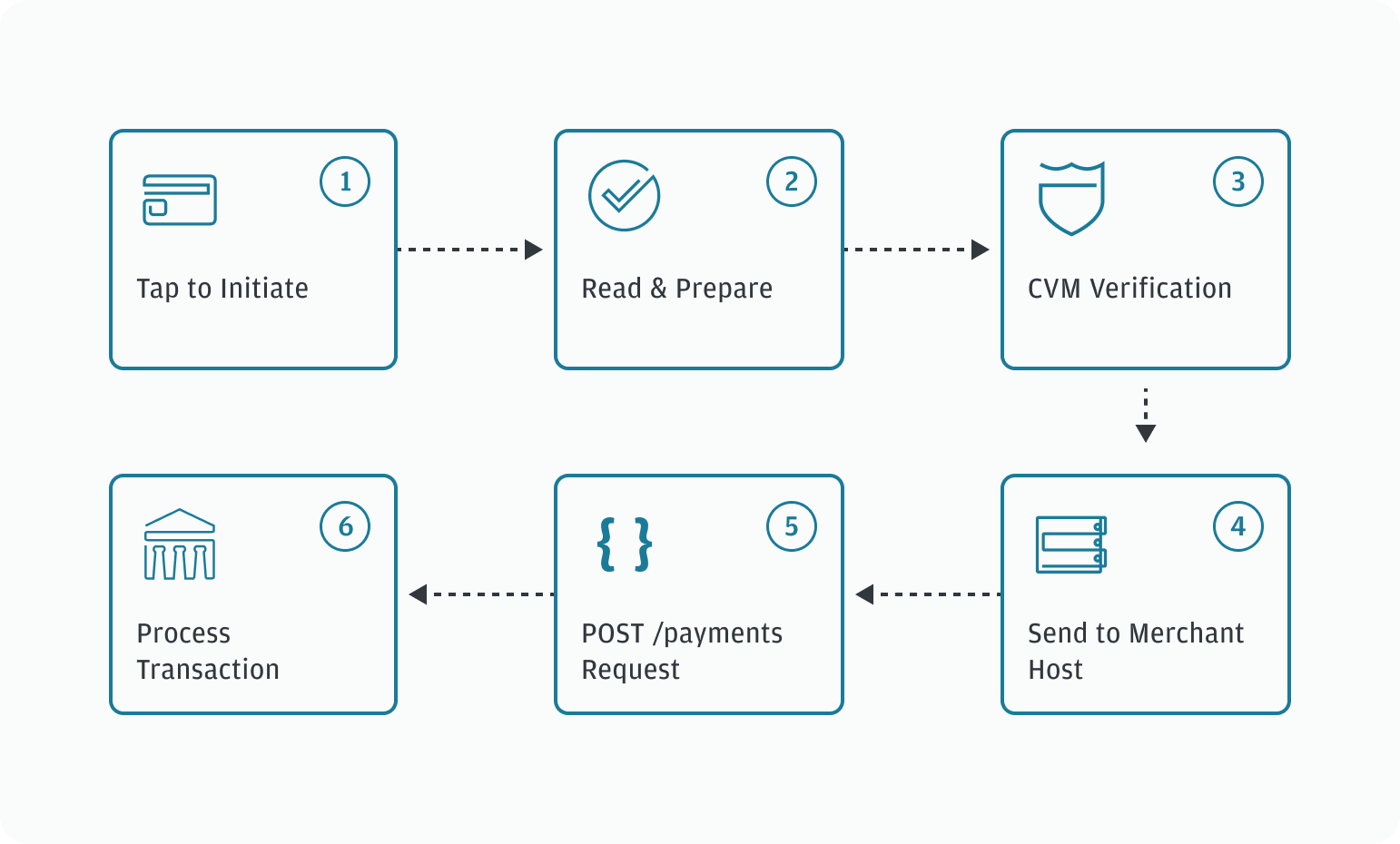
- The cardholder taps the contactless card or device to initiate an NFC connection.
- The terminal reads the EMV (Europay, Mastercard, Visa) data and prepares a transaction request with card-present fields.
- The terminal and card agree on Cardholder Verification Method (CVM), and the cardholder may enter the PIN if required.
- The terminal sends the request to your host using the established protocol.
- You map those details into a standard
POST /paymentsrequest. - J.P. Morgan processes the transaction.
Chip and PIN
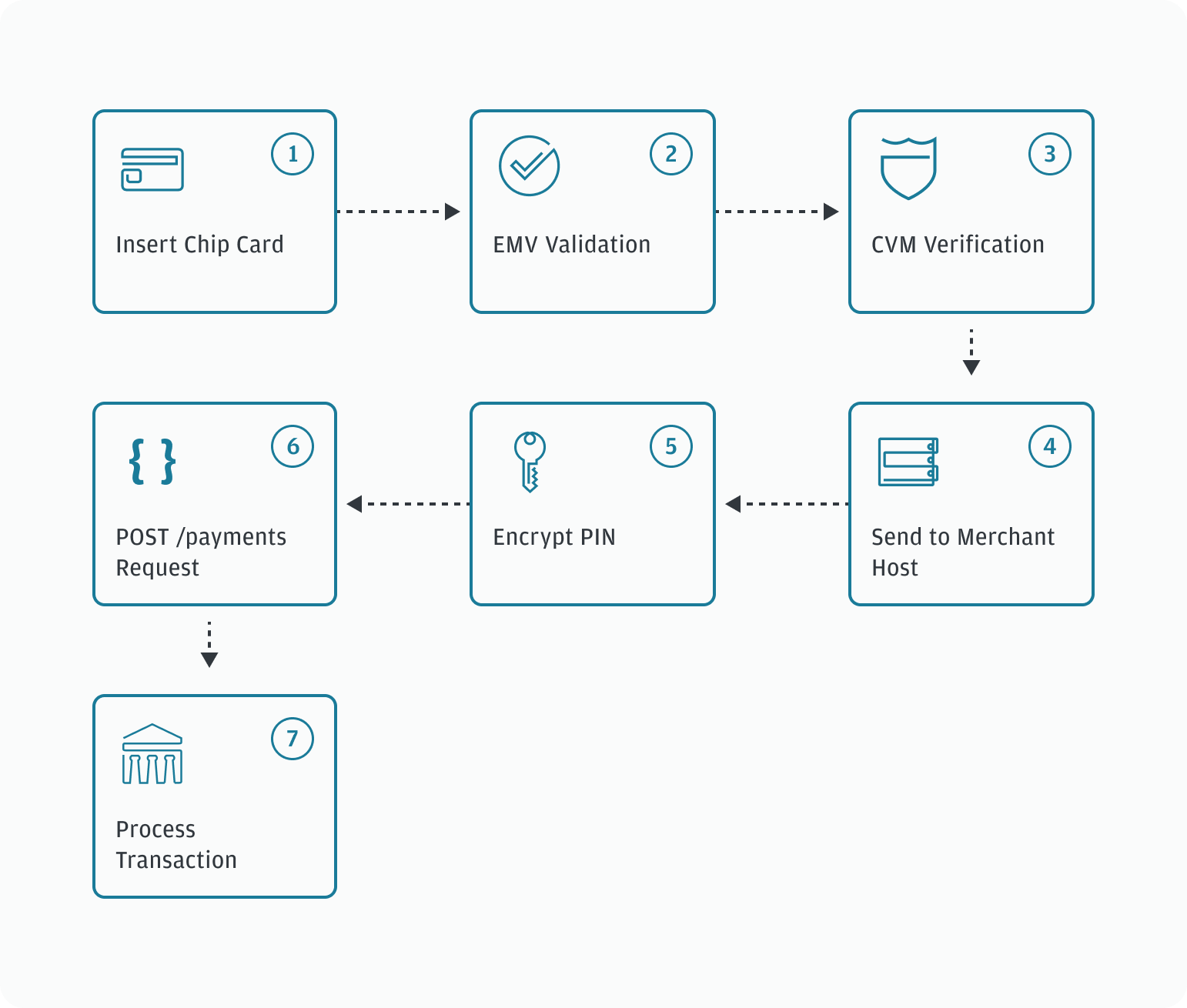
- The cardholder inserts the chip card and the EMV processing begins.
- The terminal performs EMV validation and generates the transaction data.
- The terminal and card agree on Cardholder Verification Method (CVM), and the cardholder may enter the PIN if required.
- The terminal sends the request to your host using the established protocol.
- You encrypt the PIN provided by the cardholder using the key you received via the Key Management API (
POST /keys). - Your system maps the fields and sends encrypted pin (
pinBlock), the key hash (encryptionKeyHash), and transaction details in thePOST /paymentsrequest. - J.P. Morgan decrypts it and processes the transaction.
API functionality
API identifiers
The following key identifiers are essential to payment processing using the In-Person Payments API. They are used to uniquely identify transaction details, link multiple captures to a single authorization, and retrieve payment transaction details.
| Value | Description | Assigned by |
|---|---|---|
platform-id |
Identifies the platform used to facilitate the transaction request. | In-Person Payments |
transactionId |
Identifies a payment from, or a refund to, a consumer. As there may be multiple requests to complete a transaction, a unique transactionId is assigned by J.P. Morgan and provided for each response. Use this ID to identify and perform subsequent actions, such as capturing, updating, or voiding the transaction. |
In-Person Payments |
authorizationId |
Identifies an authorization request. A payment request may have multiple authorization IDs, as in the case of a reauthorization of an expired authorization. | In-Person Payments |
captureId |
Identifies a capture request. A payment request may have multiple capture IDs for the same authorization, as in the case of separate captures for a split shipment order. | In-Person Payments |
refundId |
Identifies a refund request. A payment request may have multiple refund IDs associated with separate refund requests for the same payment request. | In-Person Payments |
paymentRequestId |
A paymentRequestId (generated on the original authorization) identifies the intent to collect a payment. A payment request may have multiple transactions associated because its lifecycle consists of several phases. These phases include various authorizations, captures, and, potentially, multiple refunds. |
In-Person Payments |
requestId |
Each message sent via an API is a request and should include a unique requestId to detect duplicate requests. In the event your system does not receive a response due to a timeout or an exception case, you can attempt to retry the request. To do so, re-send the message using the same requestId, as this allows us to ensure the message is not processed multiple times. If the original request is processed, the original response message content is returned. |
Merchant |
merchantOrderNumber |
A For Canada, EU, U.K., and U.S. implementations, the following applies:
|
Merchant |
networkTransactionId |
Unique transaction ID assigned by the payment network. | Payment brands |
Callbacks/notifications
Understanding webhooks and callbacks is essential for the In-Person Payments API. For more information, refer to the Notifications API.
Duplicate logic
J.P. Morgan performs a duplicate check on every transaction. A duplicate request is identified when J.P. Morgan receives a non-unique requestId and changes have been made to any of the following fields:
amountaccountNumberaccountHolderNameverificationValuebillingAddressLine1billingAddressLine2billingAddressCitybillingAddressStatebillingAddressCountrybillingAddressPostalCode
If changes were made to any of the previously listed fields, a 409 response code is returned, along with the following response:
{
     "responseStatus": "ERROR",
     "responseCode": "DUPLICATE",
     "responseMessage": "Duplicate Transaction"
}
If the previously listed fields are unchanged but the same requestId is used, a 200 response code is returned along with the following response:
information":{
     "code": "duplicateRequest",
     "message": "This is a duplicate request."
}