Terminal tipping using GetTipAmount
The GetTipAmount operation allows you to collect a tip on the terminal independent of a sale transaction. The operation prompts the Payment Terminal Application to display options to tip on the terminal based on a set amount and return a response with a tip amount that the point-of-sale (POS) application adds to a subsequent sale transaction.
The Payment Terminal Application supports ad hoc tip capture through the GetTipAmount operation. This operation enables the POS application to request that the Payment Terminal Application display the Tip Prompt screen at any time, without requiring an associated payment transaction. It is intended solely to capture a tip amount based on a specified reference amount.
The following is the GetTipAmount operation flow:
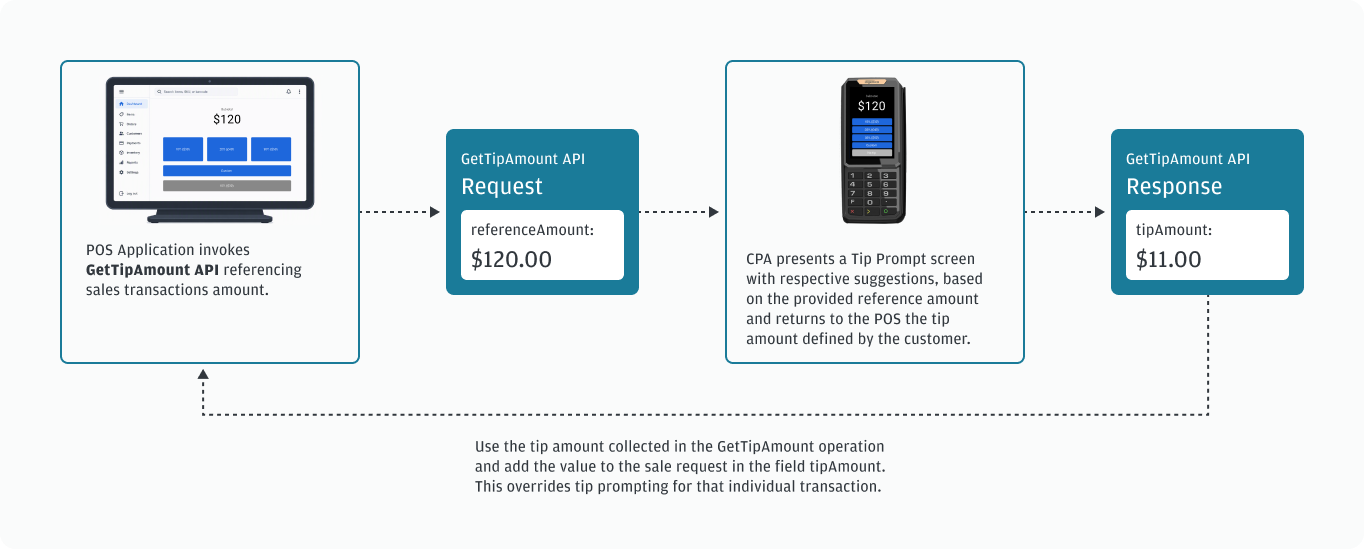
Tipping payment journeys
The following list describes common tipping payment journeys your POS application supports, particularly in scenarios where the tip is captured separately from, or needs to be allocated across, one or more subsequent sale transactions.
Each journey outlines a typical flow and where the GetTipAmount operation fits so you can implement the right logic for split checks, multiple tenders, large tips, standalone tips, or authorize/complete patterns.
- Split payments: If a check is split among multiple guests, use the
GetTipAmountoperation to collect tips from some or all cardholders, then apply those tips to the corresponding subsequent sale transactions for each cardholder. - Centralized tip capture for multiple methods of payment (MOP): When a single order is paid using multiple MOPs, the POS application captures the tip once based on the full reference amount and then determine how to associate that tip with each payment method tender.
- Handle large tips: In cases where the tip is much larger than the subtotal of the meal, such as when the cardholder uses a gift certificate that covers an expensive meal and tips on the original amount, or when a patron leaves a large custom tip, collect these tips with a separate operation and include them in the subsequent sale.
- Run a tip as a separate transaction: The POS application completes the sale transaction, uses the
GetTipAmountoperation to collect the tip, and then executes a subsequent sale transaction for just the tip amount. - Authorize and overcapture: The POS application authorizes the subtotal of the transaction, runs the
GetTipAmountoperation to capture the tip, and then sends a completion for the subtotal and the tip amount.
Other payment journeys
The GetTipAmount operation allows for customization of UI labels (refer to guidanceText fields in the tip parameter table), giving you the option to use this operation for non-tip related use cases. Examples:
- Deposit or prepayment amount: Allow the consumer to select an upfront deposit amount before a booking, rental, reservation, or an order is finalized.
- Increase the payment amount: Ask the consumer whether to round up the transaction total or add set amounts to a transaction to support a campaign or internal program.
API integration
The GetTipAmount operation prompts the Payment Terminal Application to present options for customer input. It is a standalone request/response flow separate from any payment operation. The operation follows the same tip processing behavior on a single operation as when the Payment Terminal Application parameter TIP = 1. While the prompt is active, no other operation starts.
GetTipAmount can be used two ways:
- Use tip configuration parameters to present preset tipping prompts on the terminal. This approach simplifies construction of the
GetTipAmountAPI request message for your POS application. - Use additional fields in the API request to ignore or override configured tipping parameters. This approach provides your POS application with control over the operation to change tipping prompts strategically.
GetTipAmount renders three tipping amounts or percents on the payment terminal display.
The following table lists and defines the relevant tip parameters for tipping on the terminal.
| Parameter | Description | TMS | API | Format | Value |
|---|---|---|---|---|---|
| TIP | Controls tip prompting. | Y | Y | Num |
|
| TIPCALC | Defines how the tip suggestions are calculated. | Y | N | Num |
|
| TIPOPT | Controls additional options for tip prompting when tipping on the terminal is enabled (parameter TIP=1). | Y | Y | Num |
|
| TIPTHR | Only used in conjunction with parameter TIPOPT=2 to set the threshold amount. | Y | Y | Float | Default: 2000 ($20.00) |
| NOTIP | Controls the display of the “No Tip” option on the terminal. Only applies when parameter TIP=1. | Y | Y | Num |
|
| STATICTIP | Defines a static tip percentage for the requestedAmount on every transaction when tipping on the terminal is enabled (parameter TIP=1). Percentages are expressed with 3 implied decimals; for example, 10000 represents 10.000%. | Y | Y | Float |
|
| TIPAMT1 | Defines suggested fixed tip amount for option 1 when tipping on the terminal is enabled (parameter TIP=1) | Y | Y | Float |
|
| TIPAMT2 | Defines suggested fixed tip amount for option 2 when tipping on the terminal is enabled (parameter TIP=1) | Y | Y | Float |
|
| TIPAMT3 | Defines suggested fixed tip amount for option 3 when tipping on the terminal is enabled (parameter TIP=1) | Y | Y | Float |
|
| TIPPERC1 | Defines suggested tip percentage for option 1 when tipping on the terminal is enabled (parameter TIP=1) | Y | Y | Float |
|
| TIPPERC2 | Defines suggested tip percentage for option 2 when tipping on the terminal is enabled (parameter TIP=1) | Y | Y | Float |
|
| TIPPERC3 | Defines suggested tip percentage for option 3 when tipping on the terminal is enabled (parameter TIP=1) | Y | Y | Float |
|
| TIPGUIDE | Controls how the guide text below the primary tip suggestions are presented on the tipping buttons. Only applies when parameter TIP=1. | Y | Y | NUM |
|
| TIME1 | Y | Y | NUM |
|
The following table lists and defines the GetTipAmount API request fields:
| Request field | Required or optional? |
Description |
|---|---|---|
operation |
Required | Must be sent with the value GetTipAmount. |
referenceAmount |
Optional with conditions | Required for percentage tip suggestions. Amount used to calculate tip suggestions. This value should not include tax. If omitted, taxAmount is ignored. Expressed in merchant base currency with 2 implied decimals; for example, 1000 represents 10.00. |
taxAmount |
Optional | When provided, taxAmount may be used in tip suggestion calculations depending on tipCalc or the equivalent TIPCALC parameter. Expressed in merchant base currency with 2 implied decimals. |
tipCalc |
Optional |
|
tipOpt |
Optional |
|
tipThr |
Optional | Overrides the TIPTHR parameter when included. Used as the threshold for tipOpt = 2. Expressed in merchant base currency with 2 implied decimals. |
noTip |
Optional |
|
tipAmt1 |
Optional | Overrides the TIPAMT1 parameter. Values are expressed in minor units of the merchant's base currency; for example, 500 represents USD 5.00. |
tipAmt2 |
Optional | Overrides the TIPAMT2 parameter. Values are expressed in minor units of the merchant's base currency; for example, 500 represents USD 5.00. |
tipAmt3 |
Optional | Overrides the TIPAMT3 parameter. Values are expressed in minor units of the merchant's base currency; for example, 500 represents USD 5.00. |
tipPerc1 |
Optional | Overrides the TIPPERC1 parameter. Percentages are expressed with 3 implied decimals; for example, 10000 represents 10%. |
tipPerc2 |
Optional | Overrides the TIPPERC2 parameter. Percentages are expressed with 3 implied decimals; for example, 10000 represents 10%. |
tipPerc3 |
Optional | Overrides the TIPPERC3 parameter. Percentages are expressed with 3 implied decimals; for example, 10000 represents 10%. |
tipGuide |
Optional |
|
guidanceText1 |
Optional | Populates the main Tip Screen guidance text. If omitted, Payment Terminal Application displays the default Select a Tip text. |
guidanceText2 |
Optional | Populates the Custom Tip Screen guidance text. If omitted, Payment Terminal Application displays the default Enter Tip Amount or Enter Tip Percentage text. |
tipRound |
Optional |
|
cancelLabel |
Optional | Overrides the Cancel button label when text is provided. |
timeout |
Optional | Time in seconds to display the form. If omitted, Payment Terminal Application uses the default defined by TIME1. |
The following table lists and defines the GetTipAmount API response fields:
| Response field | Description |
|---|---|
errorMessage |
Optional field that is only returned when there is an error in the API request. For example, "errorMessage":"The string [tipOpt] does not represent an <Integer> value" |
merchantID |
The Merchant ID value configured for your merchant account. |
operation |
This field is echoed with the value GetTipAmount. |
result |
The following table describes the possible result codes. |
terminalID |
Terminal ID value configured for your merchant account. |
tipAmount |
|
tipPercantage |
|
Operation flow
The GetTipAmount operation is a complex operation with a single Payment Terminal Application request and response pair that prompts the consumer on the terminal for a response. The Payment Terminal Application returns the response when one of the following events occur:
- Cardholder selects or enters a tip amount
- Screen timeout is reached
- Cardholder cancels the operation
- Operation is cancelled by the POS application
Custom tip flow
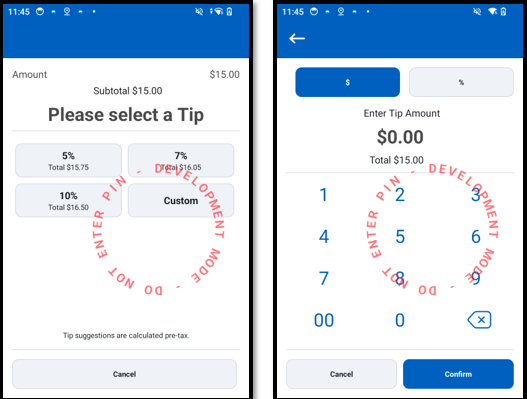
When using the GetTipAmount operation, one of the options the cardholder is presented on the Payment Terminal Application is Custom. Selecting Custom allows the cardholder to enter a custom amount or percent.
The following images display the Payment Terminal Application tip prompt screen and custom screen. On the custom screen, the cardholder can select $ to add their tip as a dollar amount or select % to add a percent of the subtotal.
The following example is a custom tip request:
{
  "operation": "GetTipAmount",
  "referenceAmount": "10000",
  "tipCalc": "0",
  "tipOpt": "0",
  "noTip": "1",
  "guidanceText1":"Would you like to leave a tip?",
  "timeout":"30"
}
The following example is a custom tip response:
{
  "merchantID":"9999999",
  "operation": "GetTipAmount",
  "result": "0",
  "terminalID":"002",
  "tipAmount": "200",
  "tipPercentage": "20000"
}
Response handling
The response echoes the operation value GetTipAmount. Regardless of whether you are sending a request for tip amounts or tip percentages, the API always returns both tipAmount and tipPercentage. The field corresponding to the consumer's selection is echoed back, and the other field is automatically calculated as the equivalent value based on the referenceAmount. Both values are returned in scaled minor units:
tipAmountis in cents for example, "200" = $2.00tipPercentageis in thousandths of a percent, for example "20000" = 20.000%.
For example, with a referenceAmount of $15.00, if the user selects a $2.00 tip ("tipAmount": "200"), the API computes and returns the equivalent percentage ("tipPercentage": "13333") meaning 13.333%.
The following are the result codes for a GetTipAmount transaction. The result code appears in the response field result.
| Result code | Description |
|---|---|
| 0 | OK: the operation completed successfully, and the response includes the selected tip amount. |
| 1 | Application Error: These errors represent failures of processes internal to the application. Examples include being unable to create a new thread, file access errors, or loss of communication. |
| 3 | Message Error: The request includes an invalid field, a required field is missing, or the request format is invalid. |
| 5 | Busy: Another operation is already in progress, and a new operation cannot be started. |
| 10 | Timeout: The prompt timed out before input was completed. |
| 11 | Cancelled by user: The cardholder pressed the cancel key. |
| 12 | Cancelled by POS: The POS application cancelled the operation. |
Receipt requirements
Receipt behavior depends on how the POS application applies the returned value to the final transaction. The GetTipAmount operation only returns the selected tip amount and percentage; it does not complete a payment transaction or automatically add the value to a receipt outside the POS-managed flow.
Use cases
The following examples show how different request configurations influence the tip prompt presented to the cardholder. Each use case demonstrates how the POS application overrides configured terminal parameters at runtime by including the corresponding values in the GetTipAmount request.
Overriding TIPPERC1-3 parameter values
{
 "operation": "GetTipAmount",
 "referenceAmount": "1000",
 "tipOpt": "0",
 "noTip": "1",
 "tipPerc": [
   "10000",
   "20000",
   "30000"
 ]
}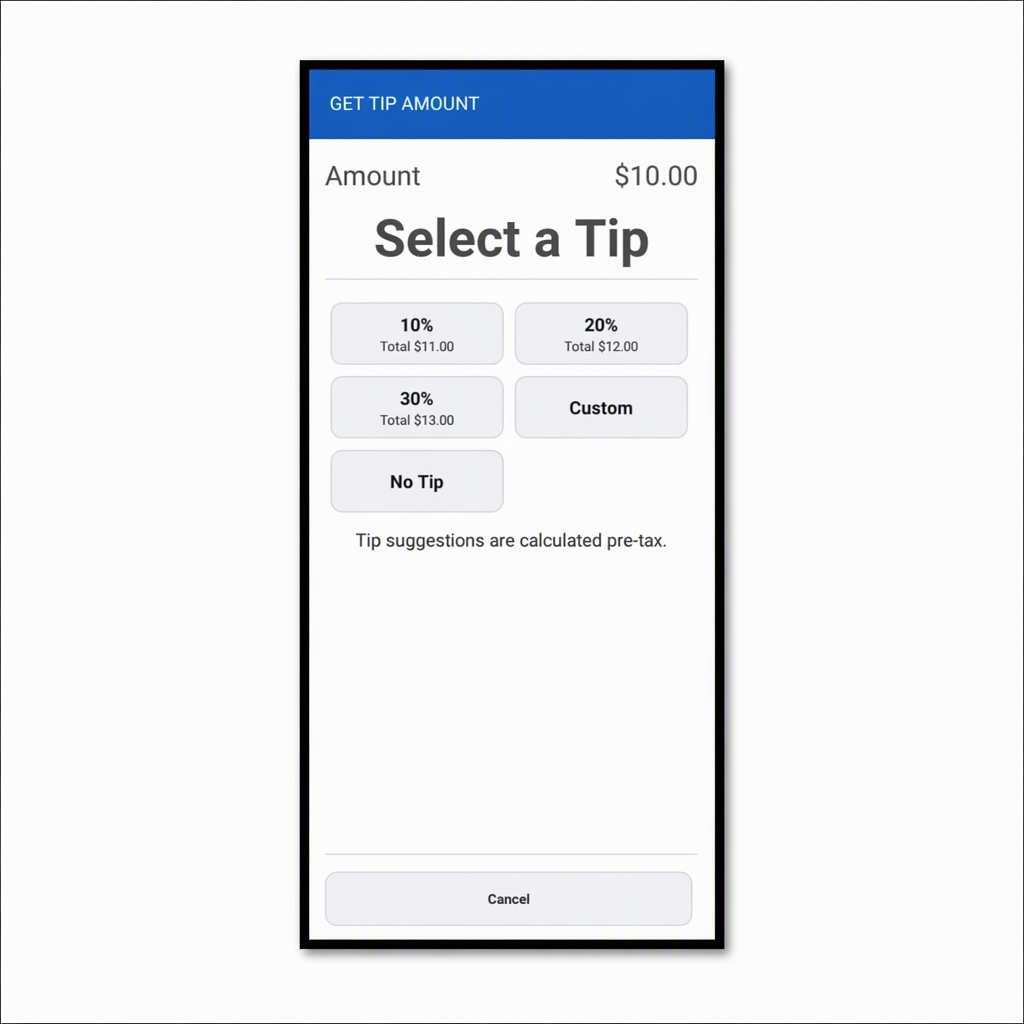
This configuration sets tipOpt to 0, which instructs the Payment Terminal Application to present percentage-based tip suggestions.
The request includes tipPerc, so the Payment Terminal Application ignores the configured TIPPERC1, TIPPERC2, and TIPPERC3 parameter values that define tip percentages and uses the percentages supplied by the POS application.
The noTip value of 1 displays a No Tip option on the screen.
Overriding TIPAMT1-3 parameter values
{
 "operation": "GetTipAmount",
 "referenceAmount": "1000",
 "tipOpt": "1",
 "noTip": "1",
 "tipAmt": [
   "100",
   "200",
   "300"
 ]
}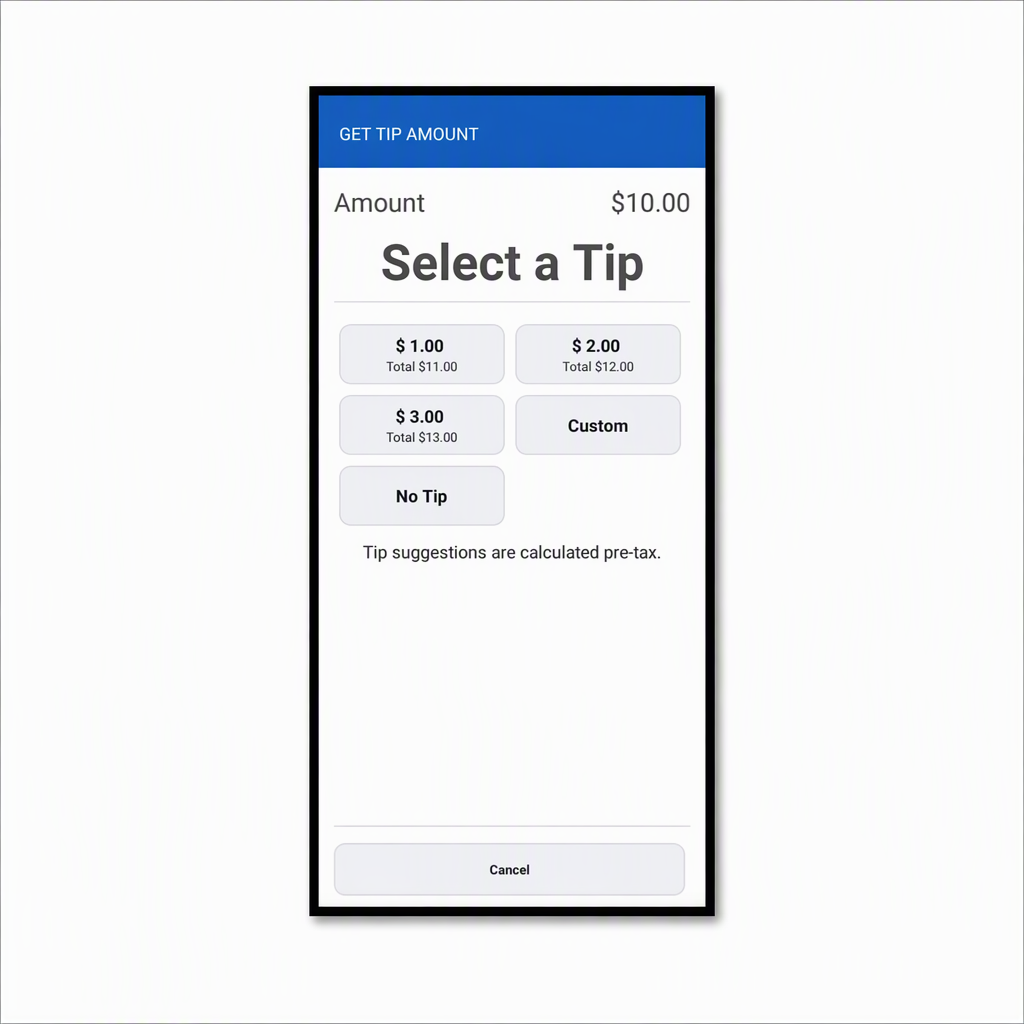
This configuration sets tipOpt to 1, which instructs the Payment Terminal Application to present fixed amount tip suggestions instead of percentages.
Because the request includes tipAmt, the Payment Terminal Application uses the supplied amount values in place of the configured TIPAMT1, TIPAMT2, and TIPAMT3 parameters that define tip amounts.
The values are interpreted as merchant base currency amounts with two implied decimals.
Request with the tipOpt field set to use amount suggestions when the value is below a threshold
{
  "operation": "GetTipAmount",
  "referenceAmount": "1000",
  "taxAmount": "200",
  "tipCalc": "1",
  "tipOpt": "2",
  "tipThr": "1500"
}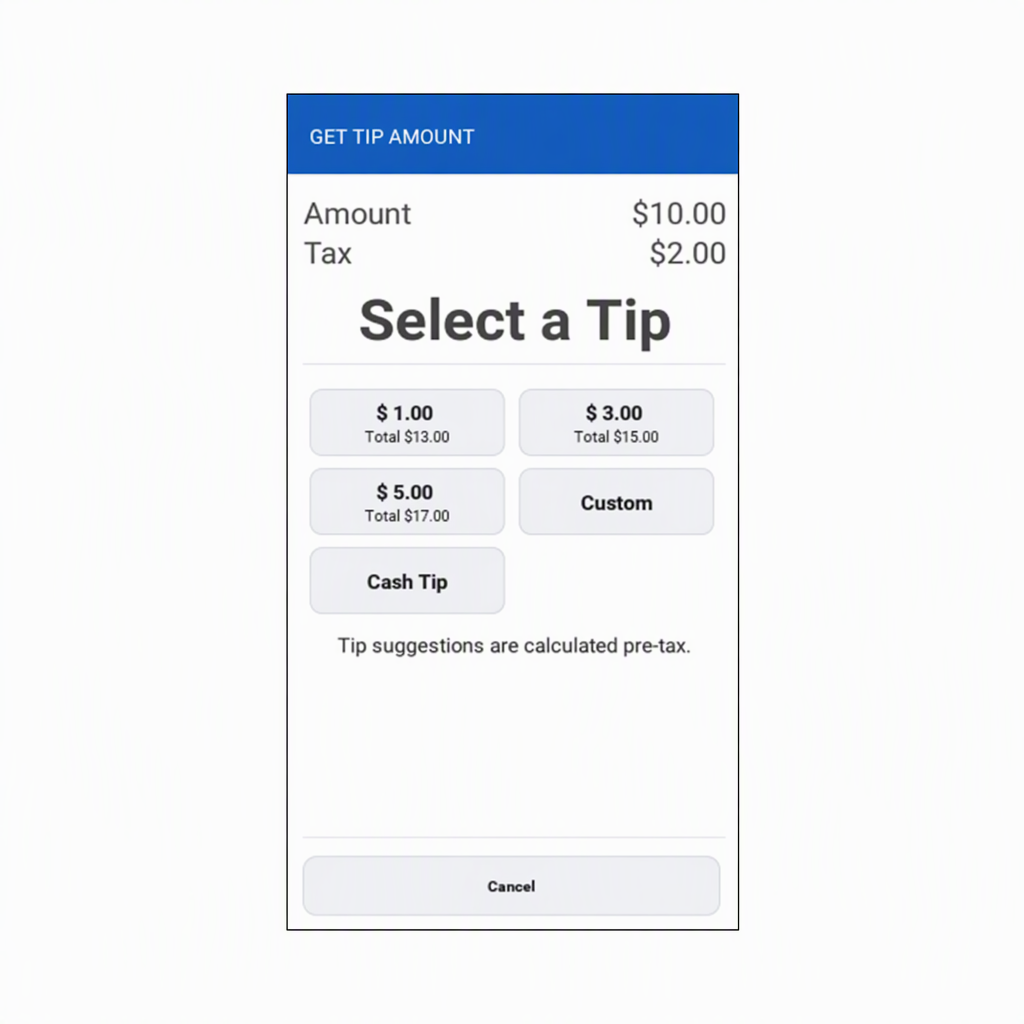
This configuration uses tipOpt set to 2 with a tipThr value of 1500. Because tipCalc is 1, the Payment Terminal Application compares referenceAmount plus taxAmount against the threshold.
In this example, 1000 + 200 = 1200, which is below the threshold of 1500, so the Payment Terminal Application presents fixed amount tip suggestions.
Request with the tipOpt field set to use amount suggestions when the value is above a threshold
{
 "operation": "GetTipAmount",
 "referenceAmount": "1000",
 "taxAmount": "600",
 "tipCalc": "1",
 "tipOpt": "2",
 "tipThr": "1500"
}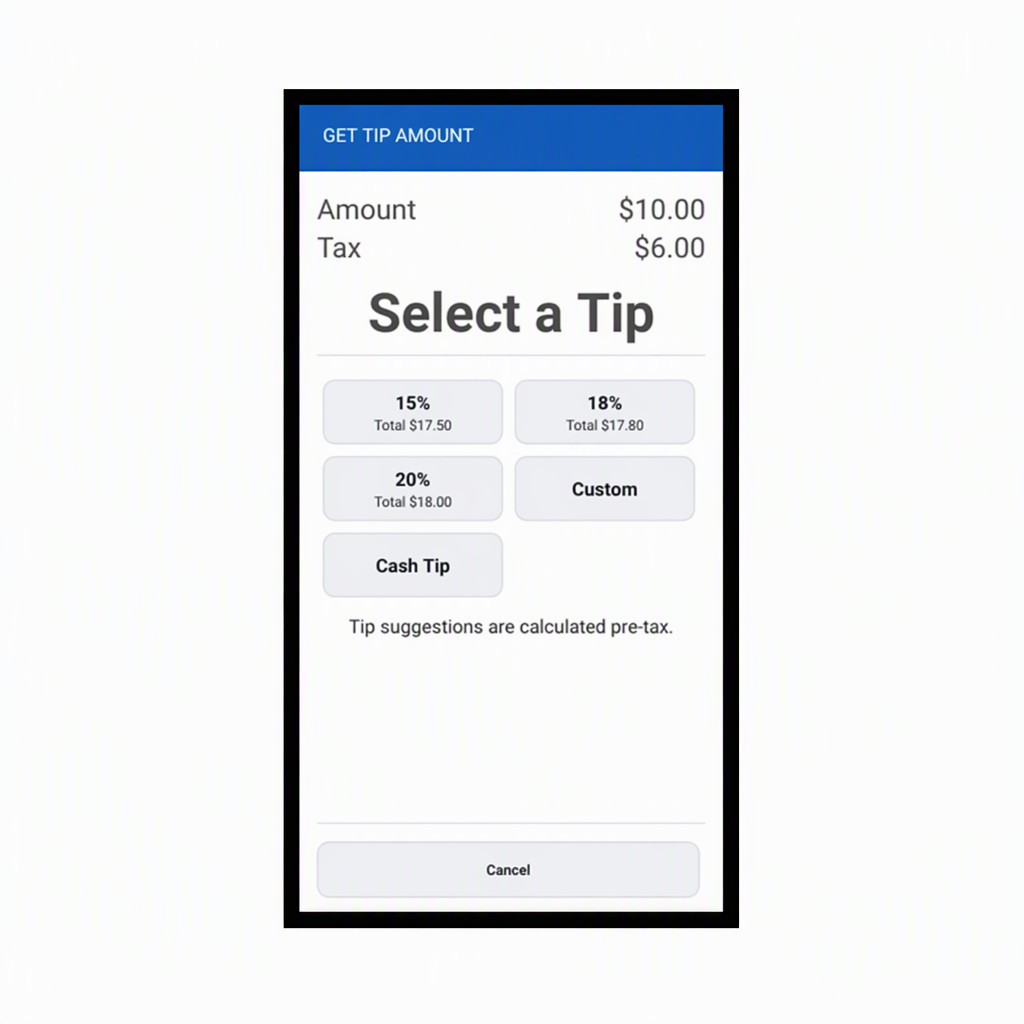
This configuration also uses tipOpt set to 2 with a tipThr value of 1500. With tipCalc set to 1, the Payment Terminal Application evaluates referenceAmount plus taxAmount.
In this example, 1000 + 600 = 1600, which is above the threshold of 1500, so the Payment Terminal Application presents percentage-based tip suggestions.